
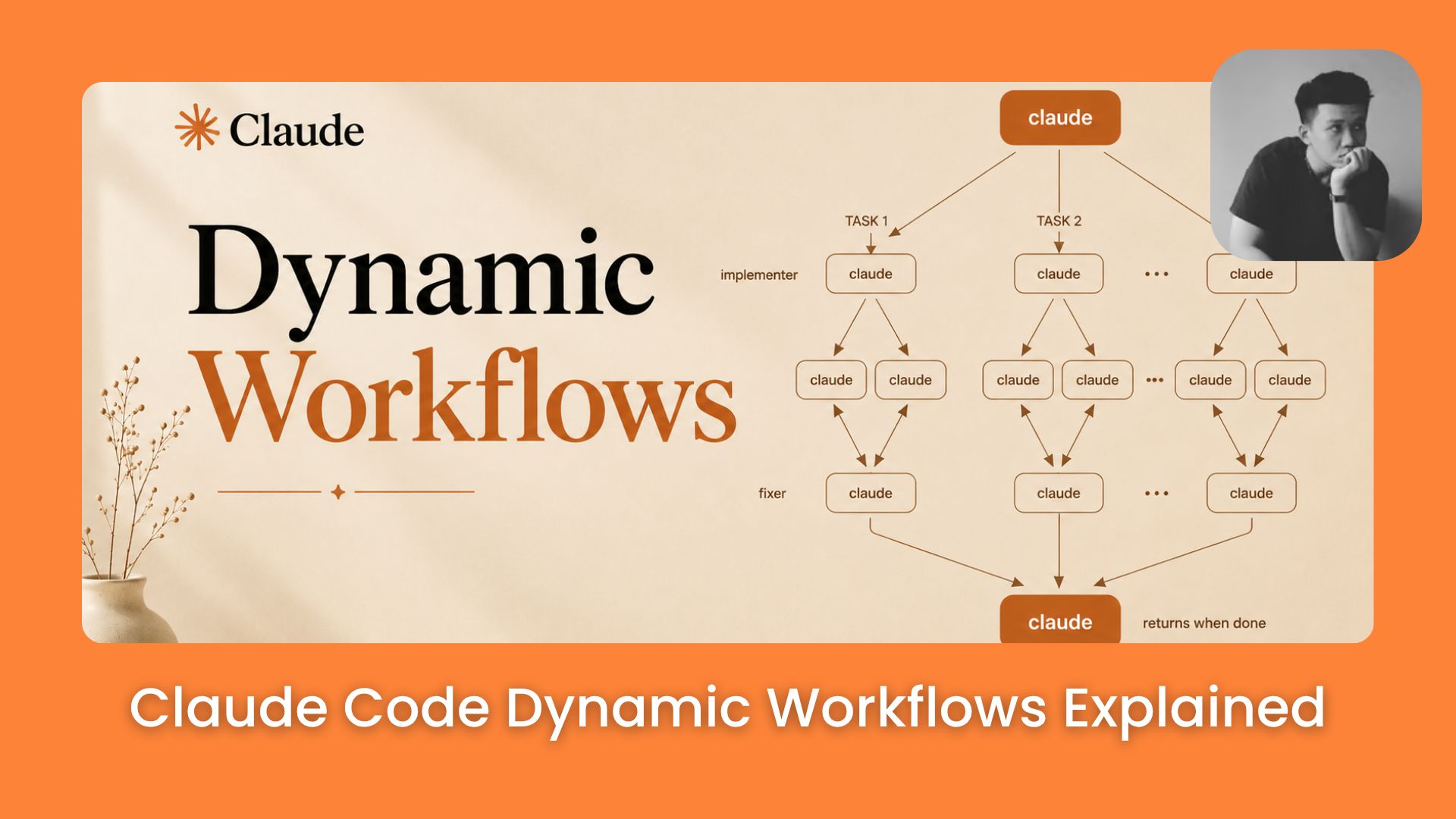
Claude Code Dynamic Workflows explained simply: when to use skills, sub agents, agent teams, /goal, and dynamic workflows without wasting money & losing control.. Ai Tools, Ai Automations.
TL;DR
Claude Code Dynamic Workflows help Claude Code handle large tasks by splitting work into smaller parts, running workers in parallel, and combining the results into a final answer. They work best when a task is large enough to benefit from parallel execution.
This guide explains how Claude Code Dynamic Workflows work, when they are worth using, how they compare with other Claude Code features, and how to avoid unnecessary token costs.
Key points
Important fact: Anthropic shared a Bun migration project that produced about 750,000 lines of Rust with a 99.8% test pass rate.
Common mistake: Using Dynamic Workflows for tasks that do not need parallel execution.
Practical takeaway: Define a clear scope before running a workflow to reduce token usage and improve results.
Table of Contents
Introduction
I almost skipped this one. When Opus 4.8 dropped, Dynamic Workflows looked like another developer feature. Big codebase. Parallel agents. Not for me.
Then I found out Anthropic’s own teams were using it before anyone else got access. Isn’t that a real signal? It literally spawns up to 1,000 subagents working in parallel on the same task.
And when I actually dug in, I found out this has nothing to do with being a coder. If you’ve ever had a task too big for one Claude session, this changes how you work.
Here’s everything you need to know. The real use cases, the hidden costs, the mistakes people are already making, and why most people outside of tech are completely sleeping on it.
I. What Are Claude Code Dynamic Workflows?
Claude Code Dynamic Workflows help Claude Code handle tasks that are too large for a normal session. Claude Code can split the work into smaller parts and coordinate multiple multiple “mini Claudes” behind the scenes.
The technical name for those mini Claudes is subagents. Each one works independently. Each one gets its own piece of the job. Claude’s context only holds the final output.
Key points
-
Dynamic Workflows coordinate multiple workers behind the scenes.
-
Claude Code creates a workflow script based on the user’s prompt.
-
Large tasks are divided into smaller tasks before execution begins.
-
Multiple workers can process different parts of a task in parallel.
-
Results are reviewed and combined into a final answer automatically.
1. What Is It, Actually?
Think of a dynamic workflow as a coordinator.
Claude Code looks at the goal, creates a plan, assigns work to different workers, then combines everything into one final result. This approach works well when a task contains many separate pieces that can be handled at the same time.
The flow looks like this:
Prompt
→ Workflow Script
→ Task Workers
→ Verification Workers
→ Final Answer
When a workflow starts, Claude Code automatically creates an orchestration script based on your prompt. That script manages the entire process, like breaking work into tasks, assigning workers, checking results, and producing the final answer.
→ The entire process runs automatically after the workflow is approved.

In the diagram below, each task is first handled by an implementer. Additional workers then review and verify the work before it moves to the next stage. Once all tasks are finished, Claude Code combines the results into a single answer.

2. How to Turn It On
Option 1: Just say the word. Type “workflow” anywhere in your prompt inside Claude Code. Something like “Create a workflow to…” and Claude will build the orchestration plan automatically.
Option 2: Turn on Ultracode. Go to the effort menu in Claude Code and enable Ultracode. This sets effort to the highest level (xhigh) and lets Claude decide on its own when a task is big enough to need a workflow.

First time you trigger one, Claude will show you the plan and ask for confirmation before running. You can review what it’s about to do before any agents spin up.
You need Claude Code v2.1.154 or later. It works in the CLI, the desktop app, and the VS Code extension.
Available on Max, Team, and Enterprise plans, and via the API. Pro users can turn it on from the /config menu under “Dynamic workflows.”
3. What It Can’t Do (Yet)
Dynamic Workflows is a research preview. That means Anthropic is still iterating.
Right now it lives inside Claude Code. There’s no version for regular claude.ai users who just want to run a big content audit or research project through a chat interface. That may come.
Based on how Anthropic has expanded features like Cowork into knowledge work contexts, I think Dynamic Workflows will follow a similar path.
The planning transparency is also still limited. You get a high-level view of the orchestration plan, but you can’t yet fine-tune how the swarm is structured before it runs. Anthropic has signaled this is something they’re working on.
II. Dynamic Workflows vs. Other Claude Code Features
So when should you use Dynamic Workflows instead of Skills, Subagents, Agent Teams, or /goal? There’re too many Claude Code features right?
Each feature is designed for a different type of work. Understanding the difference will help you choose the right option before starting a task.
Quick Reference: Which Feature for Which Job (Save this)
|
Feature |
Best For |
One-Line Rule |
|---|---|---|
|
Skills |
Repeated processes |
Same instructions, every time |
|
Subagents |
Side tasks |
A few support tasks outside the main workflow |
|
Agent Teams |
Collaborative work |
Multiple agents with different roles on one project |
|
/goal |
Specific outcomes |
Keep working until one condition is met |
|
Dynamic Workflows |
Large parallel tasks |
Many independent parts that can run simultaneously |
1. Dynamic Workflows vs Skills

Dynamic Workflows vs Skills
Skills are reusable instructions. You usually create a Skill when you want Claude Code to follow the same process every time. For example, a Skill can be used for code reviews, documentation, or release notes.
Dynamic Workflows solve a different problem. They focus on planning, coordinating, and running larger tasks.
A simple way to remember the difference:
-
Skills → provide a repeatable process
-
Dynamic Workflows → manage the execution of a larger process
In some cases, when a specific task requires a predefined set of instructions, Claude Code can use a Skill to guide that part of the workflow.
2. Dynamic Workflows vs Subagents
Subagents help Claude Code work on additional tasks outside the main workflow. Each subagent receives a task, completes the work, and returns the result. This works well when only a few separate tasks need extra help.

Dynamic Workflows vs Subagents
Dynamic Workflows add another level of coordination. Claude Code can divide a large task into many smaller tasks, assign workers, review results, and create a final answer.
When only a few support tasks are needed, Subagents are often enough.
Dynamic Workflows become more useful when many related tasks need to be managed together.
If you want to see how Subagents work in practice, check out the video below:
3. Dynamic Workflows vs Agent Teams
Agent Teams are designed for collaborative work. Different agents can take on different roles, share information, and contribute to the same objective. This approach is useful when a problem benefits from multiple viewpoints.

Dynamic Workflows vs Agent Teams
Dynamic Workflows focus more on coordination and execution. Claude Code breaks work into tasks, assigns workers, verifies results, and combines everything into one final output.
A simple comparison looks like this:
-
Agent Teams → multiple perspectives working together
-
Dynamic Workflows → one orchestrator assigning work and verifying results
4. Dynamic Workflows vs /goal
The biggest difference is the direction of the work.
The /goal command focuses on reaching a specific outcome. Claude Code keeps working until the goal is completed or the required condition is met.

Dynamic Workflows work best when a task can be divided into many independent parts and processed in parallel.
For example, fixing a difficult bug is often a good fit for /goal because the work revolves around one outcome. Reviewing an entire codebase is usually a better fit for Dynamic Workflows because many areas can be analyzed at the same time.
III. When Claude Code Dynamic Workflows Are Worth Using
Not every task needs dozens of workers or an additional orchestration layer.
Claude Code Dynamic Workflows provide the most value when a task is large enough to be divided into smaller independent parts that can run in parallel.
Let’s look at a few situations where Dynamic Workflows can be useful.
|
Use Case |
When To Use It |
How Dynamic Workflows Help |
|---|---|---|
|
Large Codebase Reviews |
You need to review many files, modules, or services across the same project. |
Claude Code can analyze multiple areas at the same time and combine the findings into a single report. |
|
Skill Audits |
You need to evaluate many Skills using the same criteria. |
Each Skill can be reviewed independently before the results are ranked and combined into one report. |
|
File Migrations |
You are handling framework migrations, API upgrades, or language migrations at scale. |
Claude Code can analyze affected areas in parallel and reduce the amount of manual review required. |
|
Multi-Part Research Tasks |
You need to evaluate several approaches or solutions before making a decision. |
Different workers can investigate different directions and combine the findings into a final report. |
Among these 4 examples, Large Codebase Reviews and File Migrations are 2 of the strongest use cases highlighted by Anthropic.
Large Codebase Reviews
Anthropic highlights use cases such as codebase-wide bug hunts, optimization audits, and security audits. These tasks often require multiple areas of a repository to be reviewed and verified before the final report is created.
File Migrations
File Migrations are another notable example. Anthropic shared a case where Dynamic Workflows helped port Bun from Zig to Rust.

The project produced roughly 750,000 lines of Rust, achieved a 99.8% test pass rate, and was completed in 11 days with hundreds of agents working in parallel and multiple review cycles.
IV. Main Risk: Hidden Token Cost Most Ignore
By now, Claude Code Dynamic Workflows probably sound impressive. The ability to split work across many workers and verify results can unlock tasks that would be difficult to handle in a normal session.
At the same time, this is also where the biggest risk appears.
Anthropic specifically warns that Dynamic Workflows can consume substantially more tokens than a typical Claude Code session.
1. Why Input Tokens Add Up Fast
Input tokens multiply across workers. A normal Claude Code session works with one main context. Dynamic Workflows are different. Multiple workers may need access to the same instructions, files, and project context before they can begin their tasks.
More workers = more analysis = more output. Each worker performs its own analysis and produces its own output. Verification workers then review those results.
→ A workflow that launches dozens of workers can consume significantly more tokens than a standard session, even when the final output looks small.

2. How To Avoid Token Waste
The safest approach is to start with a narrow scope. Before running a workflow, try to define:
-
The exact objective → what decision or output do you need?
-
The exact files or folders → don’t let the workflow roam the whole codebase if you only need part of it
-
The expected output → report? list of issues? recommended fixes?
Also: review the execution plan before approving.
Claude Code shows the plan before starting. This is your best opportunity to catch a workflow that’s trying to do more than necessary. A quick review can prevent a surprising amount of token usage.
💡 Rule of thumb: If a Skill, Subagent, Agent Team, or /goal can solve the same problem, use it. Dynamic Workflows are worth the extra cost only when parallel execution is genuinely needed.
A few more specific things to watch:
Model selection matters a lot. Every agent in your workflow uses whatever model you have active in your session. If you’re running Opus 4.8 and you spin up 500 agents, you’re paying Opus 4.8 prices times 500. Check /model before you start a large run. You can ask Claude to route lower-stakes phases of the workflow to a cheaper model.
Token costs scale with complexity. A workflow touching hundreds of files will cost substantially more than a single Claude session. There’s no flat rate. The more agents, the more tokens.
The cap is 1,000 subagents per run, 16 running at once. That’s the ceiling. Most real tasks won’t hit it, but it’s worth knowing.
Resumable runs exist for a reason. If a workflow gets interrupted, completed agents return cached results on resume. You don’t start from zero. But you do need to be aware that long workflows can run for 30 to 50 minutes or more on complex jobs.
V. How to Run Your First Dynamic Workflow Safely
You don’t need to write workflow scripts yourself. In most cases, you simply describe the task, Claude Code decides how to split the work, how many agents are needed, and how to combine the results.
Here’s a walkthrough using a real example: auditing a library of Claude Skills.
Step 1. Define a Narrow Scope Before Running Anything
Many expensive workflows start with a request that’s too broad. Write out your scope before you start:
Audit all Skills inside .claude/skills.
Identify duplicated instructions, outdated guidance, and improvement opportunities.
Create a final report with recommendations.
After receiving this, Claude Code inspects the Skills directory first to understand the scope before starting any analysis.

A clear scope makes the workflow easier to control and reduces unnecessary token usage.
Step 2. Let Claude Build the Workflow
Once the scope is clear, Claude Code builds the workflow automatically. It can break the task into smaller parts, perform different checks, and combine all findings into a single report.
You don’t need to create workers or design the execution process manually.

Step 3. Review the Plan Before Approving
Anthropic notes that Claude Code shows the execution plan before a workflow starts. Use this moment to check:
-
Is the scope what you intended?
-
Is it analyzing more files than necessary?
-
Could a simpler feature handle this instead?
A quick review here can prevent a significant surprise on your token bill.
Step 4. Review the Final Report Carefully
When the workflow finishes, Claude Code creates a final report.
This is often the most valuable part of the process because Claude Code does more than list problems. It also shows affected files, supporting evidence, and recommended fixes.

In this example, the workflow identifies outdated guidance, duplicated instructions across multiple Skills, inconsistencies, and structural improvement opportunities.
Without a workflow, you would need to open and review each Skill manually. Dynamic Workflows bring everything together into a single report.
Step 5. Save Good Workflows for Reuse
If a workflow produces useful results, save it for future use. Claude Code supports reusable workflows stored at:
.claude/workflowsThis is especially valuable for recurring tasks like Skill audits, security reviews, and migration planning. A small workflow library built over time saves setup effort and keeps repeated reviews consistent.
Conclusion
Claude Code Dynamic Workflows give Claude Code a way to handle tasks that are too large for a single workflow.
By breaking work into smaller parts and running them in parallel, Claude Code can review large codebases, audit Skills, support migrations, and verify findings more efficiently.
For many tasks, Skills, Subagents, Agent Teams, or /goal may be enough. Dynamic Workflows become most valuable when a task is large enough to benefit from parallel execution.
If you are interested in other topics and how AI is transforming different aspects of our lives or even in making money using AI with more detailed, step-by-step guidance, you can find our other articles here:
-
Master These 23+ Free Google AI Updates That Outclass Every Tool in Only 24 Hours!
-
The New Way to Build Profitable AI Websites With Gemini 3 (It Starts With One Page)
-
Claude Opus 4.8 Review: Real Tests, Real Workflows, Real Verdict. Is it the Best Model Yet?*
-
Step-by-Step Guide to Package Claude Managed Agents Into a Real Business Offer*
-
The #1 Claude AI Side Hustle Gold Rush That No One Is Talking About*
*indicates a premium content, if any
Leave a Reply