

Claude has capabilities most users never notice. These 12 practical tips unlock stronger writing, better reasoning, and more reliable outputs.. Ai Tools, 🔥 Ai Fire Academy, Ai Automations.
TL;DR
Claude is not just a chat tool. It can argue against your decisions, simulate specific readers, analyze your data, and build frameworks your team reuses for years. The difference between average and useful output is almost always how you ask, not the tool itself.
This article walks through 12 specific Claude tips with real prompts you can copy and try today. Each one solves a different problem, from writing in your own voice to stress-testing a strategy before you commit.
Key points
Most paying users have never touched the Projects feature or used Claude for decision-making.
Do not ask Claude if something is good without telling it who it is good for.
Setting up a voice prompt once saves hours of editing every week.
Table of Contents
Introduction
Claude tips are everywhere online. But most of them say the same thing: be more specific, add more context, break your prompt into smaller steps. That is fine advice. But it barely scratches the surface of what Claude can actually do.
Most people use about 10% of what the tool can do. Not because the features are hard to find. But because nobody shows you what else is possible.
This post covers 12 Claude tips that most users have never touched. Every single one is available right now, on the same plan you already have. You do not need any technical background.
Let us go through all 12, one by one.
Bonus: This guide includes ready-to-use templates, copy-paste prompts, step-by-step flows, and real output examples so you know exactly what to expect before you try each tip.
I. Claude Tips #1: Smartest Way to Make a Better Decision
Most of us look for confirmation when we have already decided something. We want someone to tell us we are right. Claude, used the usual way, will often do exactly that.
A better move is asking it to argue against you. This forces Claude outside your thinking frame and builds the strongest case against your own plan. You find the weak point before someone else does.
Key takeaways
-
Most decisions fail not because of bad execution but because of unchecked assumptions
-
Asking for validation gives you comfort; asking for counterarguments gives you clarity
-
The most useful objection usually appears within the first response
-
Works best on live decisions, not hypothetical ones
Here’s the first prompt:
I have decided to [your decision here].

Build the strongest possible case against this decision. Be specific.

Give me named failure modes, the exact points where this breaks down, and the first objection a smart, skeptical person would raise.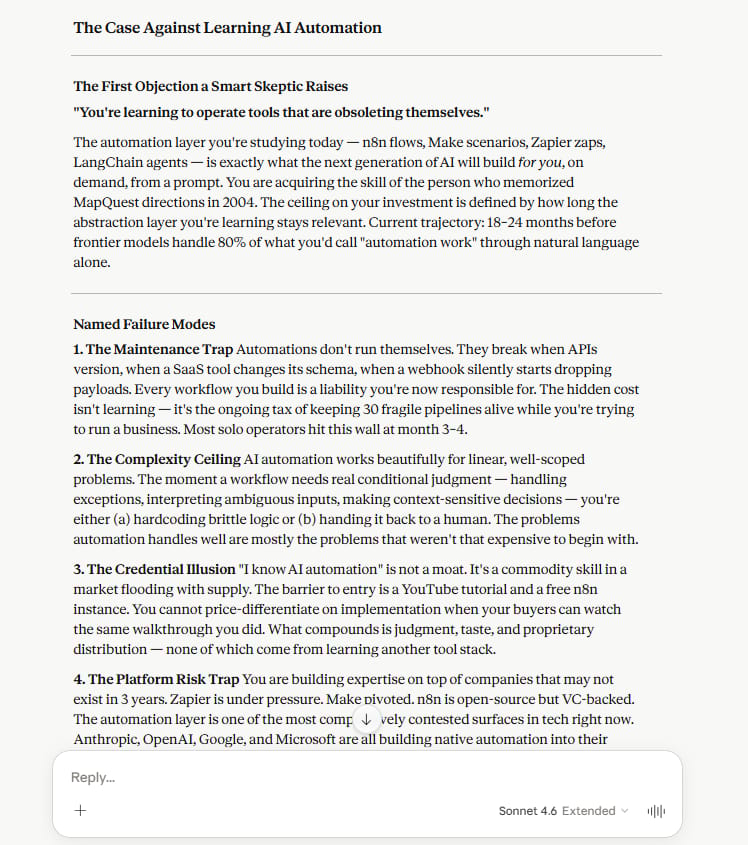
What you get back is not a list of general risks. Claude gives each failure point a name, explains exactly how it breaks, and tells you when you will likely see the problem. Not “this might be difficult.” But “here is why, and here is when it happens.”
Why does this work? Because most thinking happens inside your own head. You already believe what you believe. This prompt forces Claude to step outside that and build the best case against you.
Try it on a real decision you are sitting on right now.The more specific your decision, the more specific and useful the pushback.
II. Claude Tips #2: Interview Yourself Before You Write
Flat first drafts are almost always a clarity problem, not a writing problem. Asking Claude to interview you before writing forces you to articulate what you actually want to say. The output after this step sounds like you, not a template.
Key takeaways
-
Claude typically asks 6 to 10 questions that expose gaps in your thinking
-
Skipping this step is the main reason AI output feels generic
-
Works for any format: posts, emails, proposals, pitch decks
-
One session of this replaces 30 minutes of unfocused drafting
The usual fix is to rewrite it. But the real problem is earlier. The draft is flat because you started writing before you were actually clear on what you wanted to say.
Before you write anything, try this:
You’ve reached the locked part! Subscribe to read the rest.
Get access to this post and other subscriber-only content.
Upgrade Translation missing: en.app.shared.conjuction.or Sign In
A subscription gets you
- Instant access to 700+ AI workflows ($5,800+ Value)
- Advanced AI tutorials: Master prompt engineering, RAG, model fine-tuning, Hugging Face, and open-source LLMs, etc ($2,997+ Value)
- Daily AI Tutorials: Unlock new AI tools, money-making strategies, and industry (ecommerce, marketing, coding, teaching, and more) transformations (with videos!) ($3,650+ Value)
- AI Case studies: Discover how companies use AI for internal success and innovative products ($1,997+ Value)
- $300,000+ Savings/Discounts: Save big on top AI tools and exclusive startup discounts
Leave a Reply