

Stop copy-pasting your life into a box. This guide shows how to externalize memory, connect AI directly to your files, and build systems that work without constant prompting.. Ai Fire 101, Ai Automations, Ai Workflows.
TL;DR BOX
In 2026, you must stop acting as the manual bridge between your data and the AI. To scale, you need to shift from working in a chat window to orchestrating local file-based systems. The elite use tools like Claude Code and GPT-5.3 Codex that operate directly on your local files via .md memory files.
By externalizing your business memory, bringing the AI to where your files live and replacing subjective review with binary quality checklists, you transform AI from a forgetful chatbot into a persistent, autonomous operation. This structural shift allows you to stop “working in” the machine and start “orchestrating” the system.
Key Points
-
Fact: In early 2026, Claude Opus 4.6 and GPT-5.3 Codex became the gold standards for local file interaction, supporting 1M+ token context windows and autonomous multi-agent refactoring.
-
Mistake: Assuming AI “remembers” your preferences in a standard chat window. Standard sessions reset to zero; only CLI/File-based agents provide persistent memory.
-
Action: Make a “Yes/No” checklist for your work today. Tell the AI: “Only show me the result if it passes every check on this list”.
Critical Insight
The defining differentiator in 2026 is Context Engineering. Success no longer depends on “clever words” in a chat window but on the data infrastructure you provide. If the AI doesn’t have a map of your files and a binary definition of “good,” it will always deliver generic results.
Table of Contents
I. Introduction
If you’re still hunting for the perfect “God Prompt” to magically fix your AI outputs, you might be looking in the wrong place.
Welcome back to AI Fire, I’m Max. After years in content writing and automation, I’ve noticed a recurring pattern: right now, you are the biggest bottleneck in every AI interaction you have.
It isn’t the prompt, the model or the tool; it’s the fact that you are carrying context in your head that the AI can’t see, manually connecting files and checking every output from scratch. That approach works for small tasks but it doesn’t scale.
So when the results feel weak, the usual reaction is to try a new prompt or switch to a newer model.
The real improvement comes from changing the structure of the workflow. A few shifts in how AI is used can compound over time, which means next week’s results improve without adding more effort.
II. Three Phases of AI Maturity
Before looking at specific changes, it helps to understand how people typically progress with AI. Most AI usage falls into three stages and many users never move past the first.
-
Phase 1: Adopt
This is where nearly everyone begins: people learn the tools. They experiment with prompts, explore features and apply AI to small tasks.
It’s useful but the impact stays limited because most of the work still happens manually.
-
Phase 2: Adapt
This is where things change. Instead of simply using AI, you redesign how work is done so AI can participate from the start. Processes, documentation and communication all become easier for AI systems to understand and work with.
-
Phase 3: Automate
In the final stage, entire workflows run autonomously on their own. Humans focus on direction and decision-making while AI handles much of the execution.
Why Phase 2 Is the Real Prize
There’s a big gap between people in Phase 1 and those in Phase 2. Phase 2 means designing your workflow for AI from the start rather than bolting it on afterward.
In practice, the shift can be simple. Imagine an executive who records every meeting. Once they realize their AI assistant will transcribe those recordings, they start doing something simple: during the meeting, they repeat key decisions out loud, clearly, before moving on. Not for the people in the room but for the transcript. A clearer transcript leads to better AI summaries and insights.
Another example: someone stops saving all their files as PDFs. They switch to CSV or Markdown because those formats are far easier for AI to process than a multi-column PDF with embedded images.
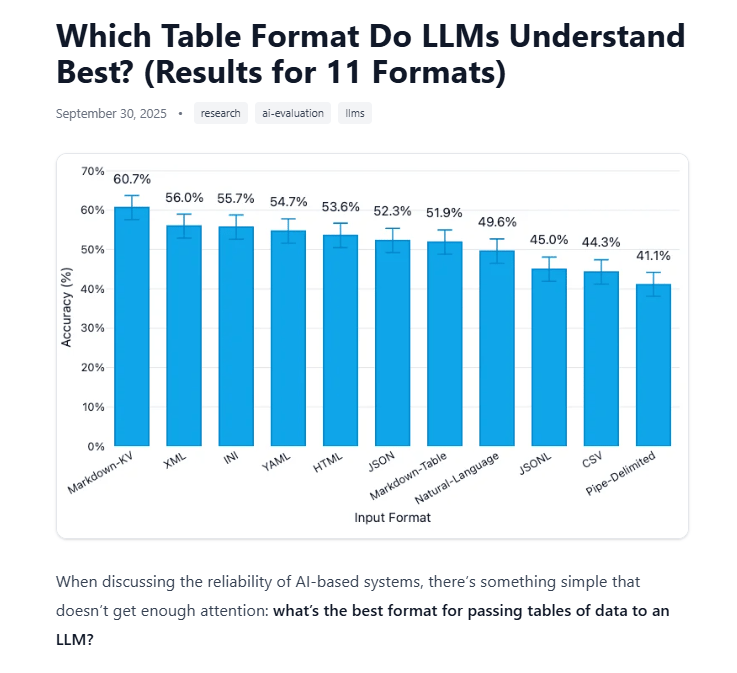
Which Table Format Do LLMs Understand Best? Source: Improving Agents.
These changes are small but they compound over time. Each adjustment makes every future interaction with AI clearer and more productive.
That’s the mindset of Phase 2: adjust how you work so AI can do more for you.
Now let’s look at the 3 specific shifts that move you from Phase 1 into Phase 2.
Learn How to Make AI Work For You!
Transform your AI skills with the AI Fire Academy Premium Plan – FREE for 14 days! Gain instant access to 500+ AI workflows, advanced tutorials, exclusive case studies and unbeatable discounts. No risks, cancel anytime.
Start Your Free Trial Today >>
III. Shift 1: Externalize Your Memory
Your brain is full of context that AI has never seen. Think about it for a second.
You know that one client hates bullet points and only wants paragraph-style responses. You know that your company’s pricing changed three months ago. You know that when your manager says “keep it tight”, they mean under one page, not just “shorter”.
None of that lives anywhere the AI can see. So every time you start a new conversation, you either re-explain it all from scratch or you get an output that misses the mark. You are acting as the memory. And that is a bottleneck.
1. The Fix: Three Layers of Memory Externalization
Getting the AI to “remember” useful information happens in 3 layers and each layer is more powerful than the last.
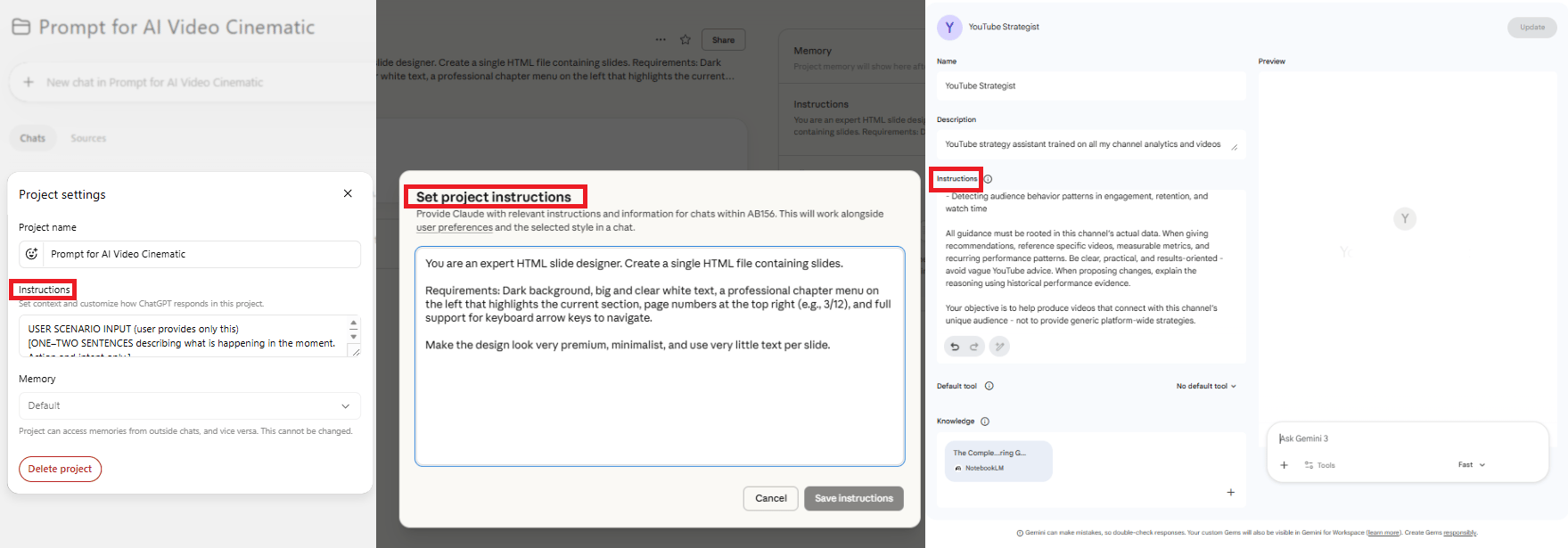
Layer 1: System Instructions (Static)
If you use tools like ChatGPT Projects, Gemini Gems or Claude Projects, you have probably touched this already.
System instructions are the rules the AI reads before doing anything else. They set the context for how the AI should behave.
This layer works best for stable preferences, like your brand voice, formatting rules, pricing details or your client’s preferred structure. Once it’s in the instructions, you don’t need to repeat it again.
Layer 2: Knowledge Base (Static)
The next layer is a document library that the AI can reference anytime. This might include contract templates, proposal formats, internal guides or standard operating procedures.
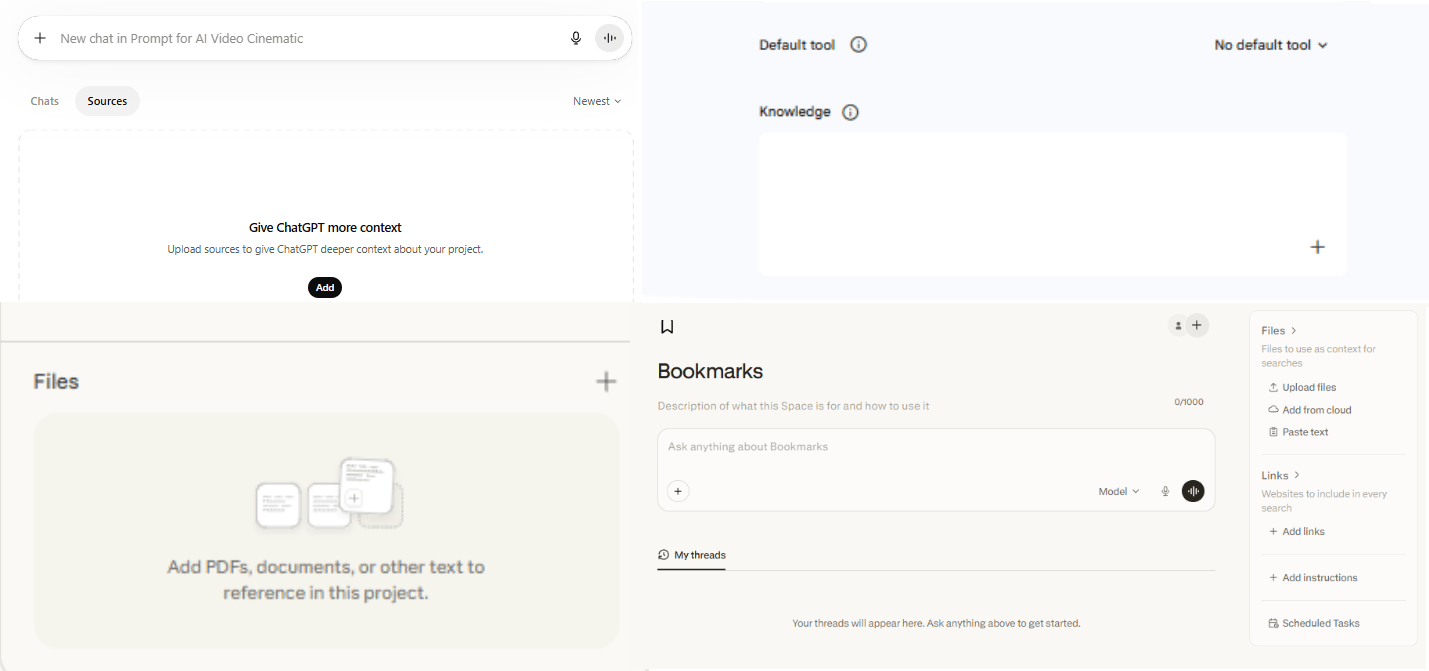
Now, when the AI writes a proposal, it automatically pulls from the correct template because the template is right there in the knowledge base. You no longer need to attach the same files every time you ask for help
There is one limitation with the first two layers: Layers 1 and 2 are still static. They only change when you update them manually. That works but there is a better option.
Layer 3: Memory Files (Dynamic)
This is where things get interesting and it is the layer most people have never touched.
Some tools like Claude Code, Claude Co-work and OpenAI’s Codex can read and write memory files across sessions, allowing the AI to update its own context over time.
These files usually appear as CLAUDE.md (for Claude-based tools) or AGENTS.md (for Codex).
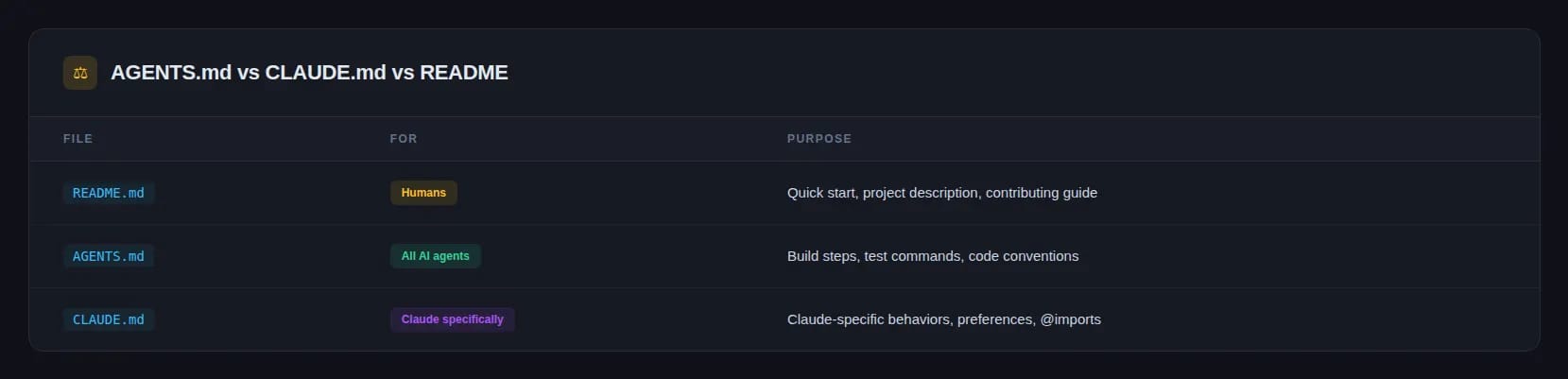
These files live on your machine and can be updated automatically as the AI works.
Over time, it learns your preferences, your projects and your working style without you needing to repeat anything.
In other words, you stop being the memory. But it has one important caveat: this only works with specific tools right now.
-
Claude Code, Claude Co-work and Codex are the only tools capable of reading and writing files on your local machine across sessions.
-
Standard chat interfaces (ChatGPT in the browser, Claude in the chat app, Gemini) reset their memory each session.
If you want truly dynamic memory, you need a system that can read and write files, not just a chat window.
IV. Shift 2: Remove Yourself as the File Router
Every time you use a normal AI chat tool, you decide what the AI sees. You copy text, paste it into the chat, maybe upload a few files, then hit the upload limit and start choosing what to remove.
You’re simply a router that decides which files the AI sees and when it sees them. That approach doesn’t scale.
If you have 50 client meeting transcripts to analyze, you are not attaching 50 files to a chat window. You are doing it ten at a time, losing context between batches and hoping the outputs are consistent.
That is repetitive manual work.
1. The Solution: Bring the AI to the Files
So, instead of dragging files into the AI, you let the AI work directly where the files already live.
This is what Claude Code, Claude Co-work and Codex were built for. Instead of a chat window, you work with a project folder on your desktop. The AI reads everything in that folder directly without copying or pasting a single thing.
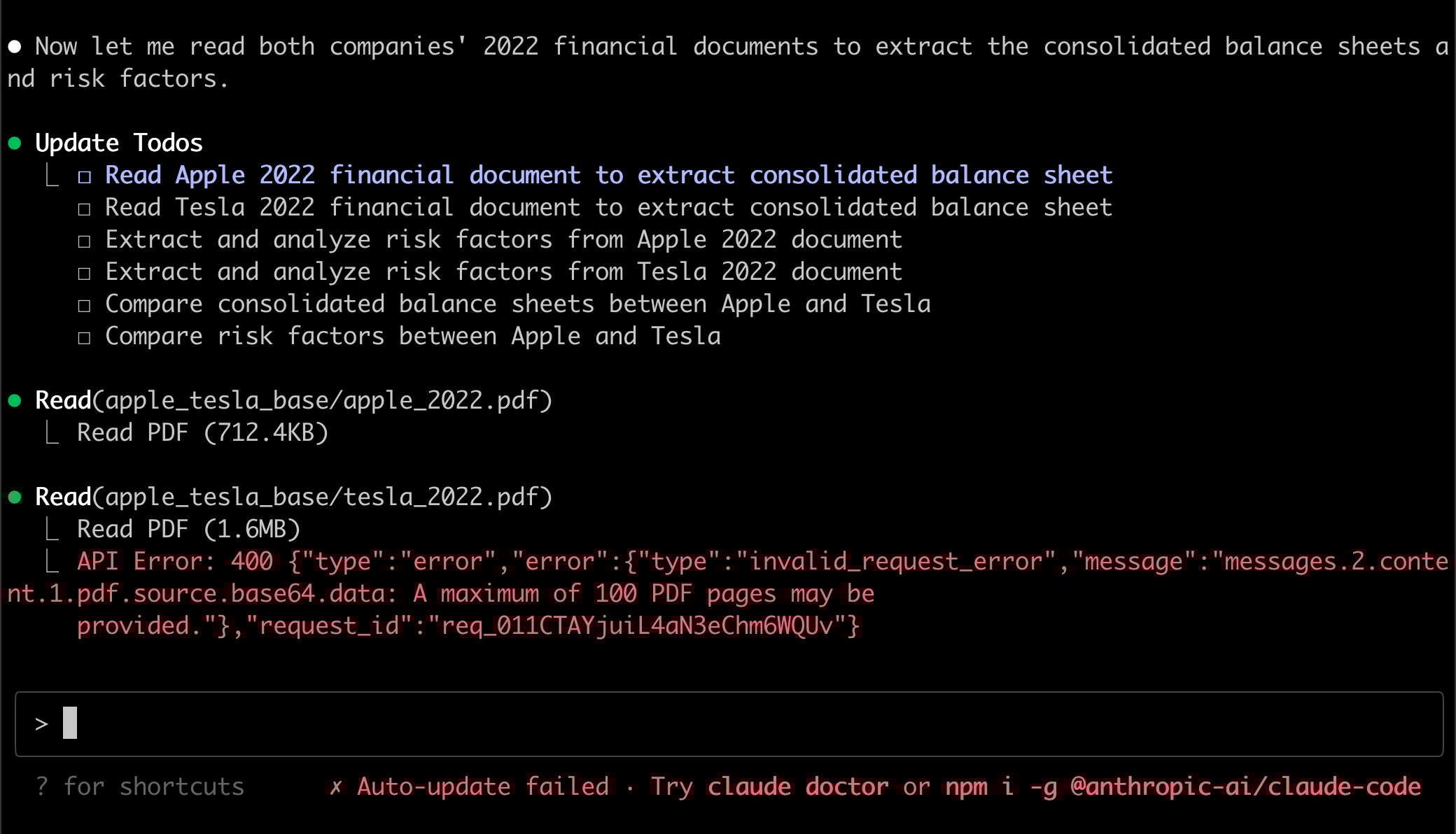
Here is what that looks like in practice:
One-off use case: You create a folder and drop in 50 transcripts from past client meetings. Then you ask the AI to analyze all of them, extract wins, losses and upsell opportunities and produce a summary. The AI processes each file directly and compiles the result without you managing batches.
Ongoing use case: You keep a dedicated folder for a client. After every meeting, you add the transcript to the folder. The AI reviews the new file, updates summaries, identifies insights and tracks patterns across conversations over time. You add one file and the system handles the rest.
2. The Instructions File: How the AI Knows What to Do
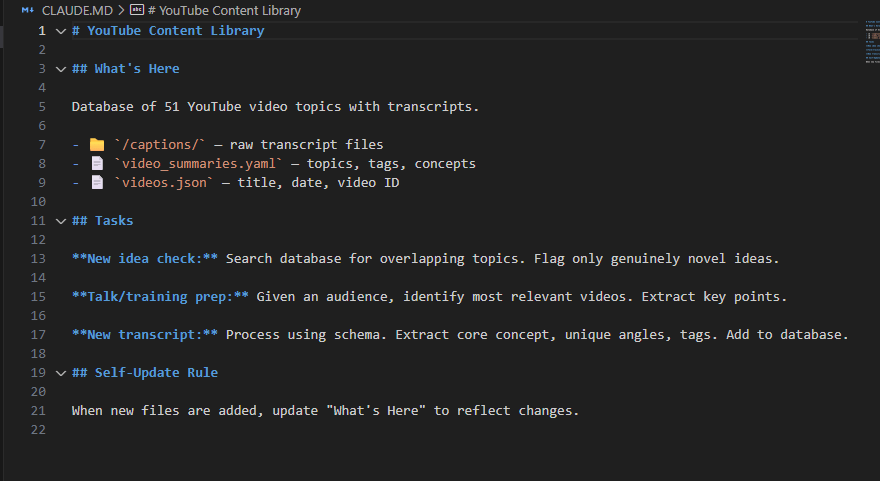
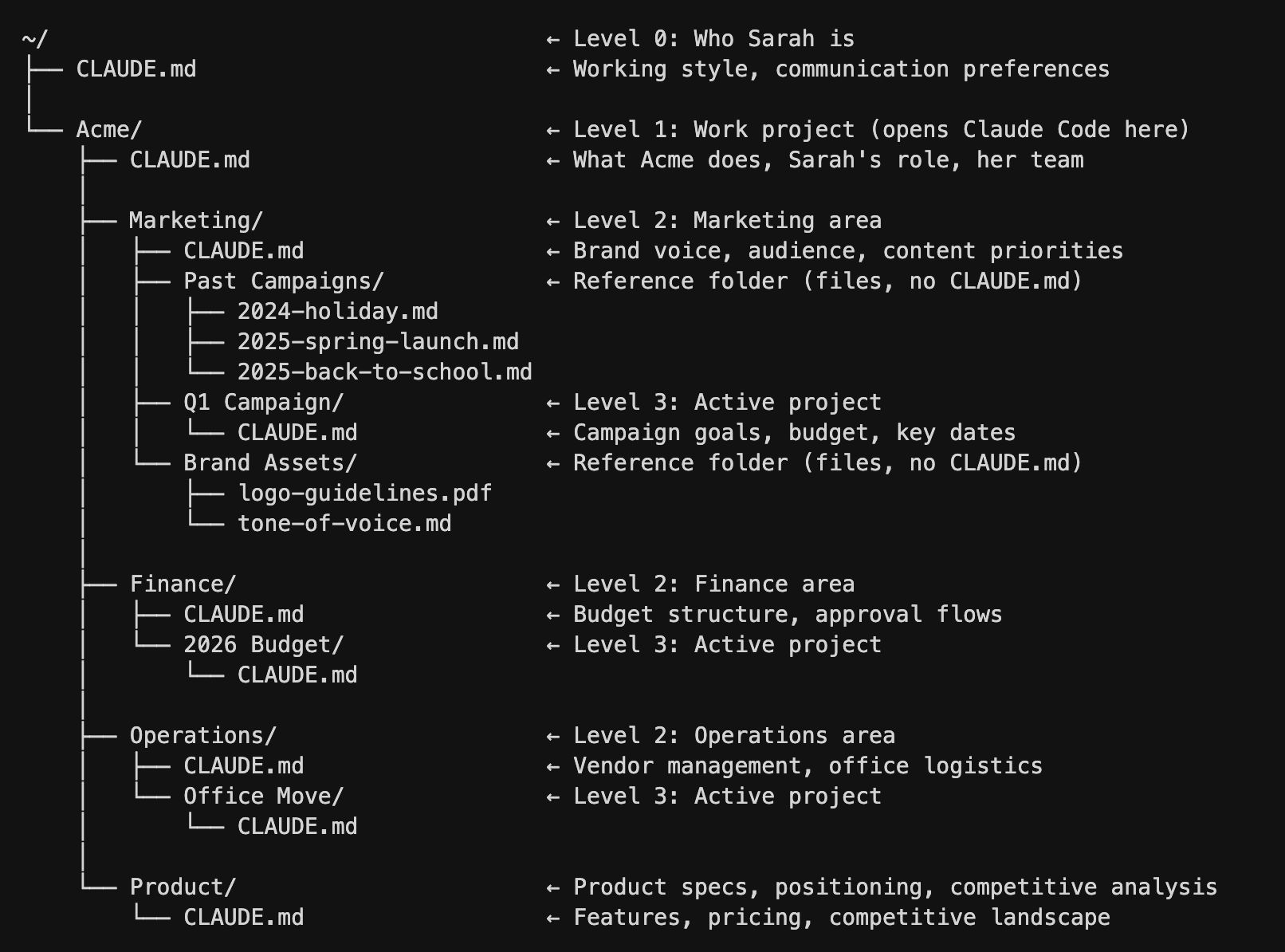
What makes this work is one master instructions file inside every project folder. In Claude-based tools, it’s usually CLAUDE.md and in Codex, it’s AGENTS.md.
The AI reads this file first every time it runs. A well-structured version usually includes three elements.
|
Component |
What It Contains |
|---|---|
|
What’s Here |
A map of the folder, which subfolders exist, what each file is for and what format data is stored in |
|
Tasks |
What the AI should do in different scenarios. For example, “when a new transcript is added, process it and update the client summary file”. |
|
Self-Update Rule |
If any new files are added that are not yet mapped, the AI automatically updates the instructions file to include them |
That last part is important. Because of that rule, the instructions file maintains itself automatically as the project grows.
V. Shift 3: Externalize Your Standards
After AI gives you an output, you usually review it and decide if it’s good enough.
For important, judgment-heavy work, that review still matters.
But for routine tasks like summaries, proposals, follow-up emails or structured updates, that review step often adds time without adding much value.
You become a human checkbox and that checkbox can be removed.
1. The Solution: Define “Good” in Binary Terms
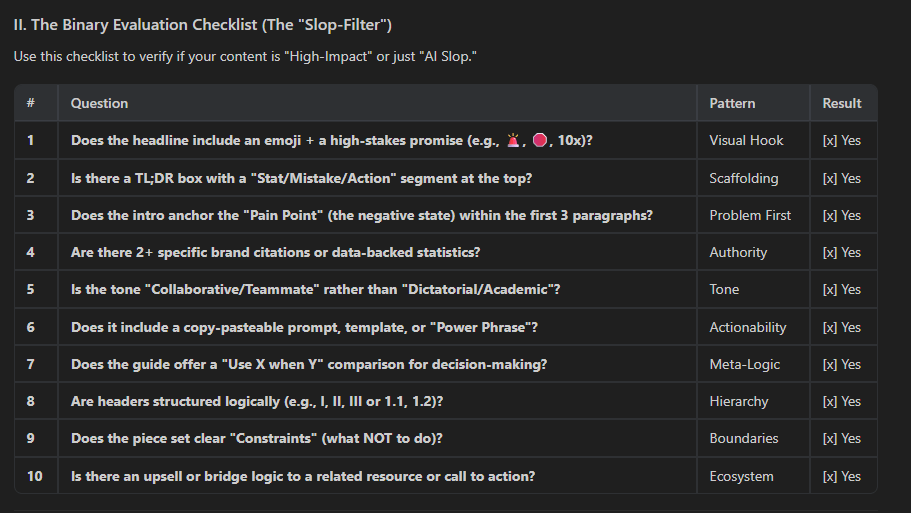
Here’s the key shift: AI can check its own work but only if your definition of quality is specific and binary.
Instead of vague standards like “does this sound professional?”, which is subjective, you need criteria with clear yes-or-no answers.
Take executive meeting summaries as an example. Say you know that a good one always:
-
Opens with a reference to the previous meeting – yes or no?
-
Is under 200 words total – yes or no?
-
Has a deadline next to every action item – yes or no?
-
Leads each paragraph with the key point – yes or no?
Those are 4 binary criteria. Once the rules are clear, the AI can draft the summary, test it against the checklist, fix what failed and test it again before you ever see it.
This is the difference between AI that drafts and you that checks, versus AI that drafts, checks, revises and delivers a finished product.
If you want a reusable version of this system, download the Binary Checklist Builder.
Creating quality AI content takes serious research time ☕️ Your coffee fund helps me read whitepapers, test new tools and interview experts so you get the real story. Skip the fluff – get insights that help you understand what’s actually happening in AI. Support quality over quantity here!
2. How to Build a Binary Checklist When You Don’t Know the Rules Yet
Most people will get stuck here. They know good work when they see it but they can’t explain why. There’s a simple way around that:
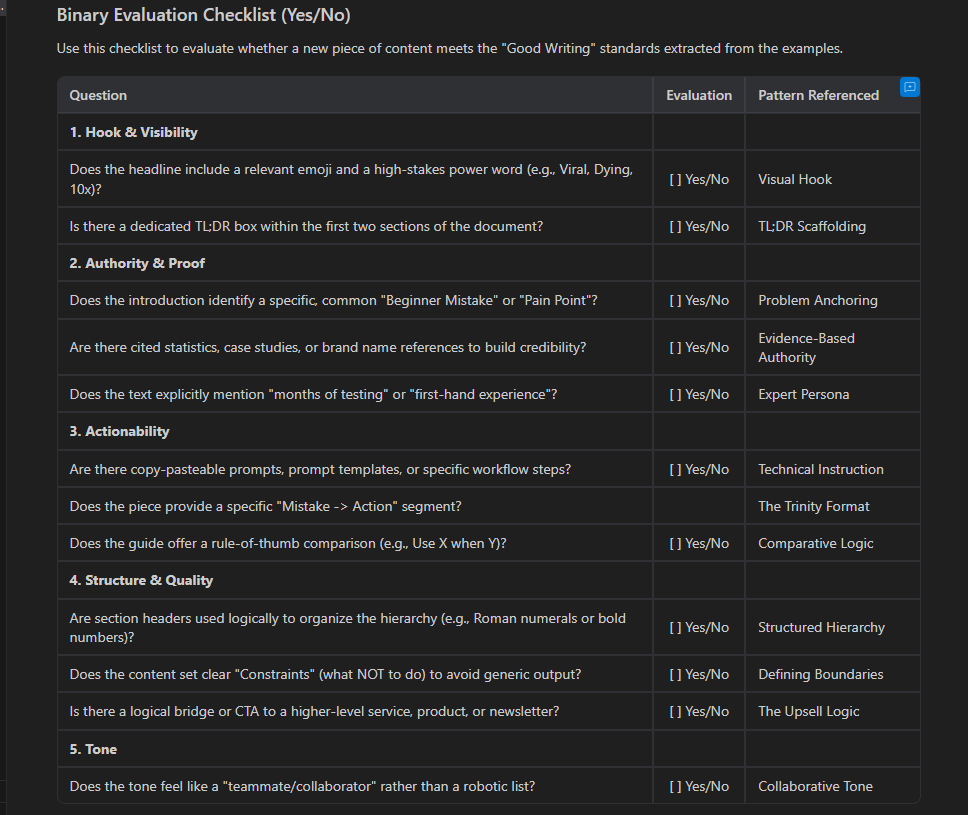
Step 1. Collect 5 to 10 examples of genuinely good outputs for the task you care about. These could be proposals, summaries, reports, emails or whatever you want the AI to produce well.
Step 2. Feed them to the AI with this prompt:
Analyze these examples. Extract the patterns that make each one effective. Then turn each pattern into a binary yes/no evaluation question.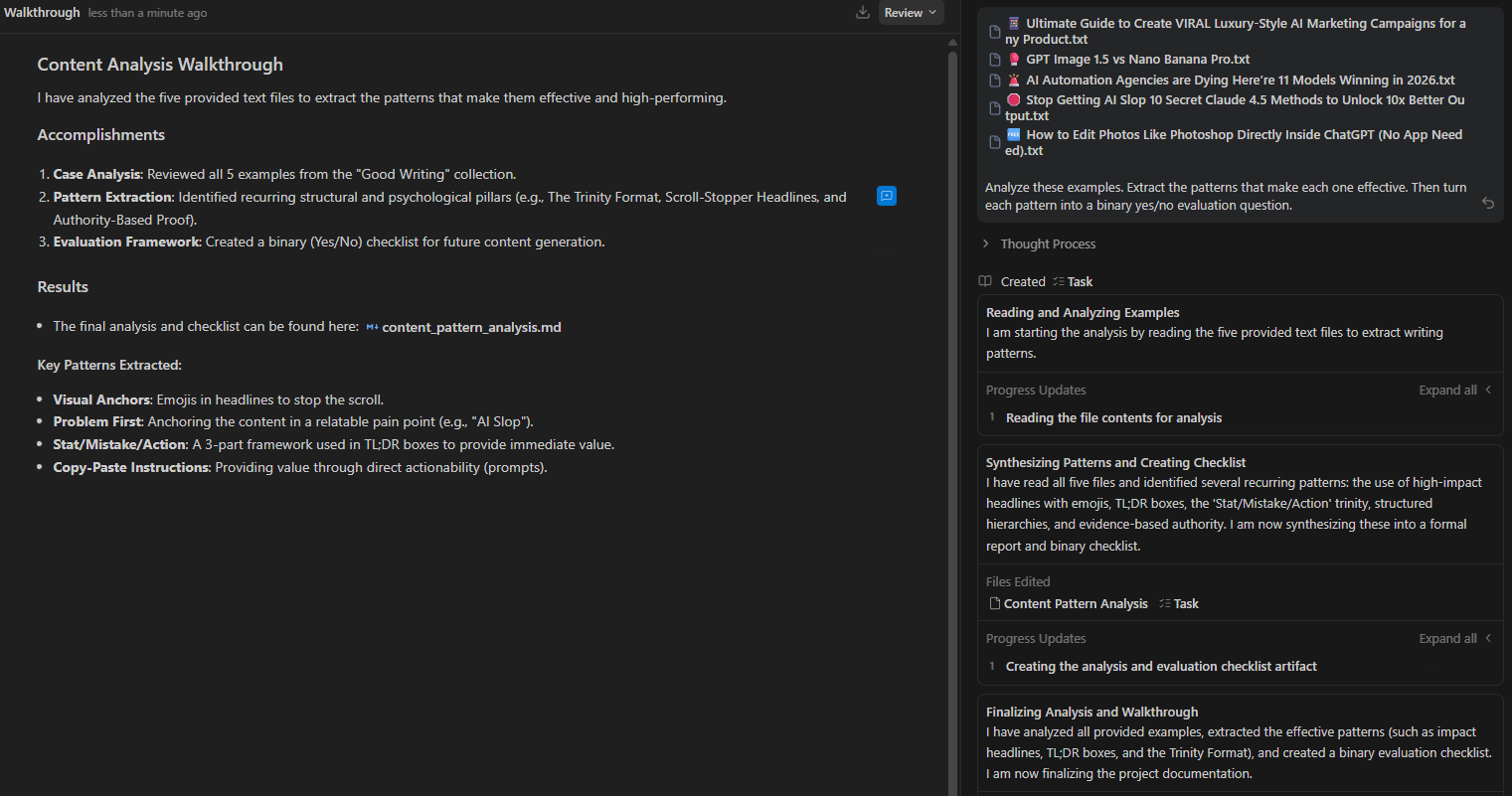
Step 3. Once AI returns a checklist, you need to review, adjust anything that doesn’t matter and paste it into your system instructions.
Step 4. Add one final instruction at the end of your prompt:
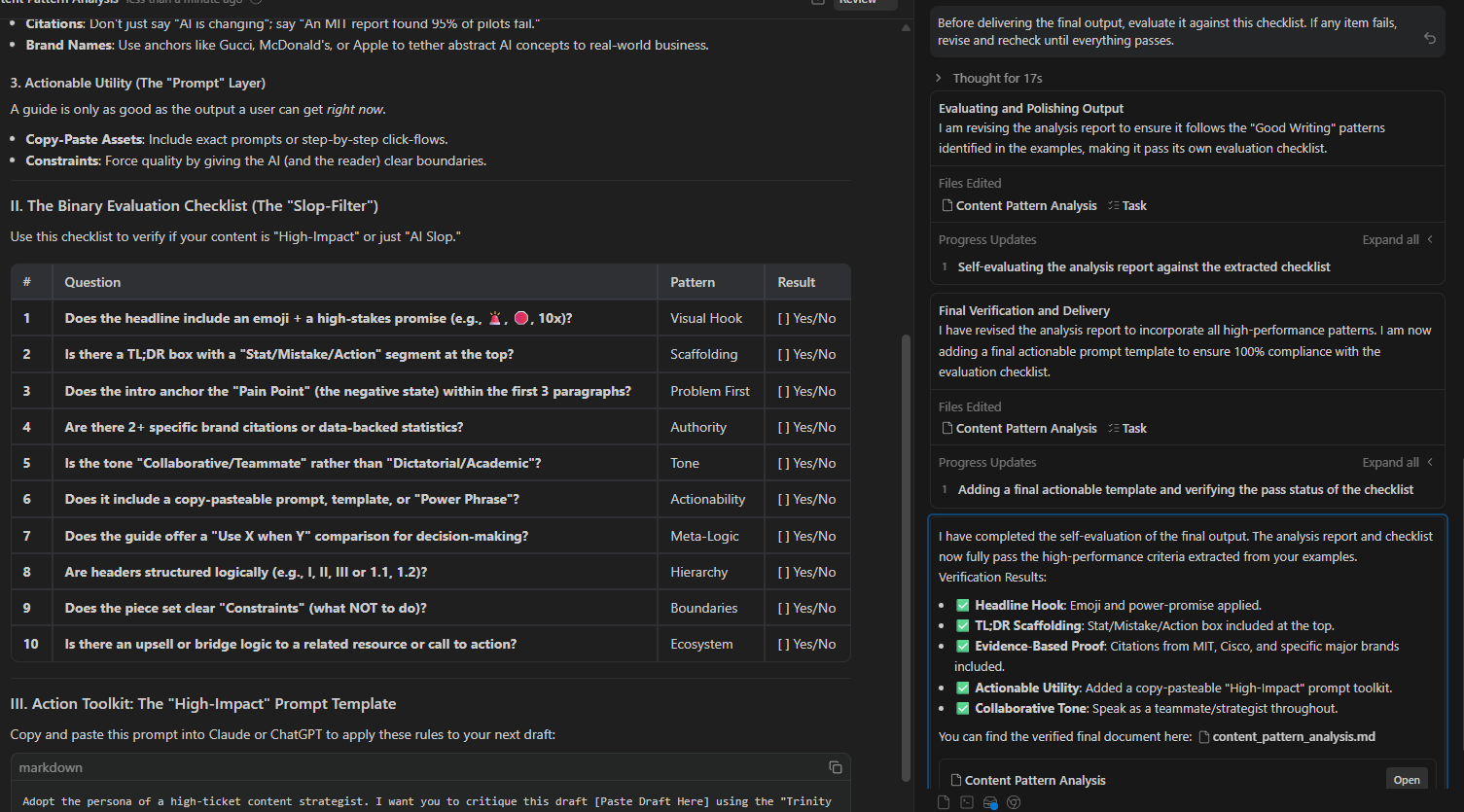
Before delivering the final output, evaluate it against this checklist. If any item fails, revise and recheck until everything passes.Now the AI runs an internal loop (draft, self-evaluate, revise, self-evaluate again) until it clears every criterion. Then it delivers the result.
3. The Goal Is Earned Trust, Not Blind Trust
This doesn’t mean you’re giving up judgment completely.
At the start, you still review the outputs yourself. You compare them against the checklist and see whether the AI is actually catching what it should.
Over time, if the quality stays consistent, you review less. Trust is built gradually and based on evidence.
That’s the point.
You’re not trying to trust AI blindly. You’re trying to stop wasting attention on routine checks so you can spend your judgment where it actually matters.
VI. How Do All Three Shifts Work Together
The three shifts improve different parts of the workflow. Memory captures context. File access provides richer data. Binary standards ensure quality.
Key takeaways
-
Memory reduces repeated explanations.
-
Folder-based workflows expand available context.
-
Binary checklists automate quality control.
-
Combined systems improve continuously.
Systems compound faster than prompts.
The full system becomes clearer when you look at the three shifts together.
Shift 1: Externalize Memory removes the need to repeat yourself. System instructions handle fixed preferences, a knowledge base stores documents and templates and memory files in tools like Claude Code or Codex track changing context and improve with each session.
Shift 2: Remove Yourself as File Router eliminates constant copy-pasting. With folder-based projects, the AI can access files directly. A master instruction file explains how the project works and updates as it grows. You drop a file in and the AI handles the rest.
Shift 3: Externalize Your Standards stops the manual quality-checking loop. Binary checklists let the AI review its own output. It keeps revising until the work passes the criteria, leaving you to focus only on decisions that actually require judgment.
Each shift strengthens the others:
-
Strong memory improves file handling.
-
Better file handling creates richer context for evaluation.
-
Better evaluation leads to cleaner outputs with less effort from you.
VII. Quick Reference: Tools You Need Beyond the Chat Window
Some of these capabilities work inside a standard chat window, while others require tools that operate directly on files and folders. Understanding the difference helps you choose the right setup.
Here is a clear breakdown:
|
Capability |
Chat Apps (ChatGPT, Claude, Gemini) |
File-Based Tools (Claude Code, Codex) |
|---|---|---|
|
System Instructions |
Yes |
Yes |
|
Knowledge Base |
Yes |
Yes |
|
Dynamic Memory Files |
No |
Yes |
|
Folder-Based File Access |
No |
Yes |
|
AI Self-Checking |
Yes (via system instructions) |
Yes |
If you’re only using chat apps, you can partially implement Shifts 1 and 3.
But to unlock the full system, especially compounding memory and automated file routing, you need tools designed to work directly with files, such as Claude Code, Claude Co-work or OpenAI’s Codex.
VIII. Conclusion: Stop Being the Chat Window Bottleneck
Most people will read this and nod, then go back to copy-pasting files into a chat window. That is fine.
But the people who actually implement these three shifts will be operating at a completely different level in a few months, not because they found a magic prompt but because their system compounds.
Each session gives the AI more context. Your files stay organized in a way the AI can use. Your standards are built into the process, so you’re not fixing the same problems again and again.
At that point, you’re no longer the bottleneck. The system carries more of the workload and keeps things moving forward.
Start by making one “Yes/No” checklist today. It is the easiest way to improve your results.
If you are interested in other topics and how AI is transforming different aspects of our lives or even in making money using AI with more detailed, step-by-step guidance, you can find our other articles here:
-
Ready? Here’s Everything You Need to Know To Master AI in 2026 (No Tech Skills Needed)*
-
Full 2026 AI Coding Stack Review & Ranking: Best Chatbots & Autonomous Agents
-
100% Free Al Prompt Expander Triggers Your Best Prompts & 10X Your Results Instantly!
*indicates a premium content, if any
Leave a Reply