
Most people do automation wrong. Learn the simple three-step framework to map your work, filter decisions, and build custom apps that run your company.. Ai Tools, Ai Automations.
TL;DR
Successful business automation in 2026 is built on clarity, not just code. Many efforts fail because they automate messy processes or chase vanity metrics that don’t drive real results. By deconstructing invisible “mental” work into a visible three-step rhythm – Input, Decision, and Action, you can identify which tasks to automate and which to keep human. The ultimate goal is to move beyond temporary chat windows into structured, no-code apps that provide a permanent, organized control center for your entire company.
Key points
-
Strategy: Use “Process Deconstruction” to turn invisible mental steps into a clear, automatable map.
-
Triage: Sort tasks into “Low-Risk” (fully automated) and “High-Stakes” (human-led, AI-supported).
-
Execution: Transition from chatbots to structured apps using tools like Base44 for consistent data management.
Critical insight
Automation is a multiplier; if you automate a mess, you simply scale a mistake, so you must clean the process before you build the tool.
Table of Contents
Introduction
Have you ever tried to use AI to fix your workload, but ended up feeling more confused than before? Many people open ChatGPT, type a few things, and get a wall of text. It feels cool for 5 minutes, but it doesn’t actually do the work for you.
The problem isn’t the AI, and it certainly isn’t you.
The issue is the order of operations. Most of us jump straight to the tools – the “how”, before we understand the “what.”
After working with many companies for a long time, I realized that business automation is not about fancy code. It is about clarity.
If you can see how your business works on paper, you can automate it.
In this guide, I will walk you through a simple 3-step method. We will move from a messy workflow to a fully functional app that runs your business for you. Let’s dive in.
I. Why Do Most Business Automation Efforts Fail Before They Start?
Many automation projects fail because they focus on vanity metrics that make charts look good but don’t drive actual growth. Automating a flawed or messy process only scales the mistake faster, rather than fixing the underlying problem.
To succeed, you must define what a healthy company looks like first and choose targets that represent real progress instead of just busy work.
Key takeaways
-
Fact: Goodhart’s Law states that once a measure becomes a target, it ceases to be a good measure.
-
Contrast: Fast ticket closing might lead to poor service, while 100 automated emails might just be 100 bad ones.
-
Detail: Business automation acts as a multiplier of your existing process quality.
-
Action: Define your successful destination before touching any tools.
I learned a hard lesson early in my career: ‘The dashboard is not the territory.’
It is easy to obsess over vanity metrics like how many emails were sent or how fast a ticket was closed, because they make the charts look green.
But these numbers often hide the truth about whether your decisions are actually driving real results or just creating busy work.
This distinction is critical because business automation acts as a multiplier. If you automate a process based on the wrong metric, you don’t solve the problem; you just scale up the mistake.
We are not here to make the dashboard look perfect; we are here to build a system that fundamentally improves the health of your company.
There is a rule called Goodhart’s Law.
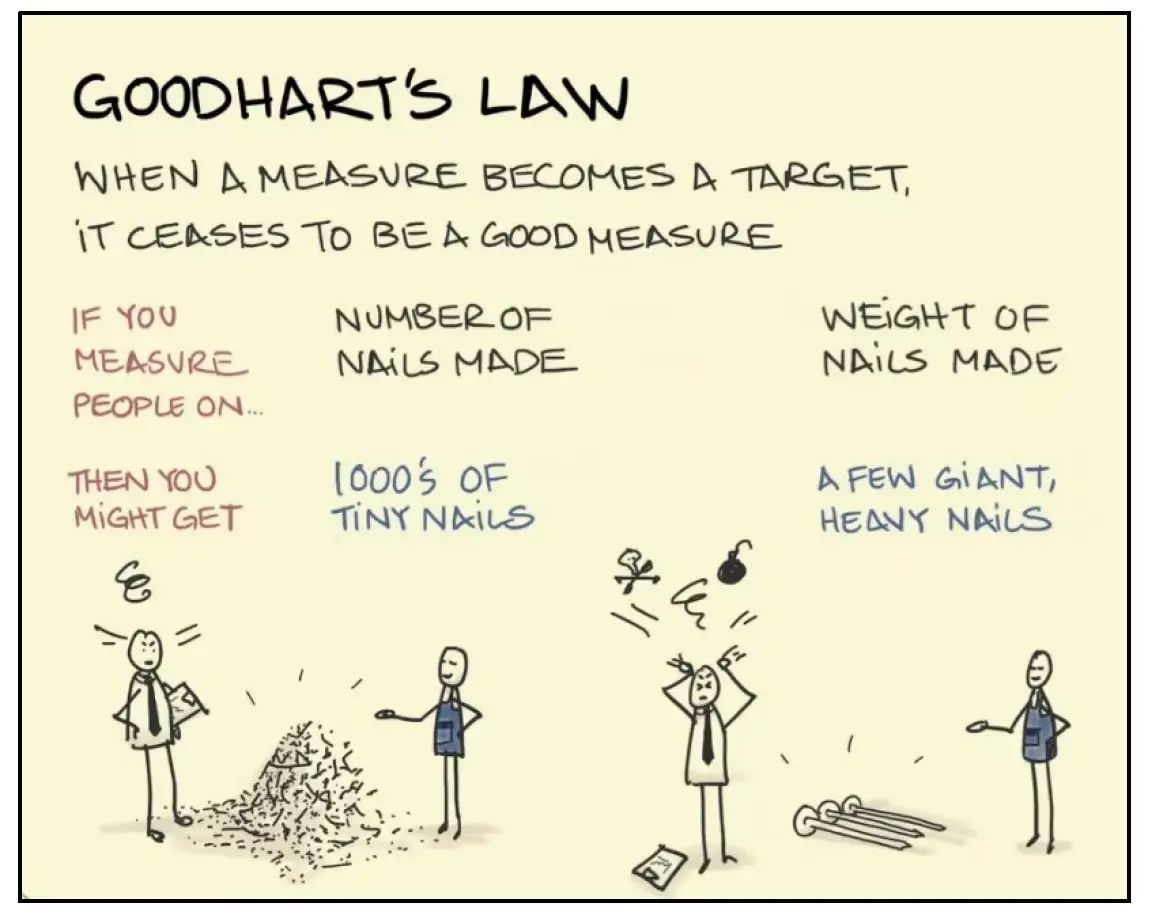
It says that when a measure becomes a target, it stops being a good measure.
Think about it this way:
-
If you tell your team to “close tickets fast,” they might rush and give bad answers just to hit the number.
-
If you tell AI to “write 100 emails,” it will do it. But they might be terrible emails.
Business automation is very good at doing exactly what you tell it to do. If you tell it to automate a mess, it will just make the mess happen faster.
So, before we start, ask yourself: What should be different when this works?
-
Do you want more free time?
-
Do you want zero errors in your data?
-
Do you want your customers to feel happier?
Define the success first. Once you know the destination, the path becomes clear.
Learn How to Make AI Work For You!
Transform your AI skills with the AI Fire Academy Premium Plan – FREE for 14 days! Gain instant access to 500+ AI workflows, advanced tutorials, exclusive case studies and unbeatable discounts. No risks, cancel anytime.
Start Your Free Trial Today >>
II. Map Invisible Work to Enable Business Automation
Most office work is invisible because the thinking happens inside your head, making it impossible for AI to assist without a clear map. Process Deconstruction involves writing down every micro-step of a task, from receiving information to the final follow-up. By visualizing this flow, you can spot “mental reminders” and hidden bottlenecks where leads or money are currently falling through the cracks.
Once you have mapped out these friction points, you can deploy specific productivity AI tools designed to handle these tasks, ensuring that execution becomes just as flawless as your plan.”
Key takeaways
-
Stat: Task rhythm generally follows three phases: Input, Decision, and Action.
-
Difference: Manual “mental reminders” are usually where leads go cold and businesses lose money.
-
Timeframe: Mapping a simple process like Instagram lead handling takes only a few minutes on paper.
Now that we have the right mindset, let’s look at the work itself. The biggest challenge with office work is that it is invisible. It happens inside your head.
When an email arrives, you don’t just “reply.” You read it, you stress about it, you check your calendar, and you wonder if you should ask your boss.
1. Process Deconstruction
AI cannot see that thinking process. If you want business automation to help, you must make the invisible visible.
We call this “Process Deconstruction.”

It sounds fancy, but it just means writing down what actually happens. Almost every task follows the same rhythm:
-
Input: Information arrives (a text, an email, a form).
-
Decision: You figure out what to do with it.
-
Action: You do the work.
2. Real Example
Let’s look at a real example:
Imagine you get leads via Instagram DM.
-
Input: A message pops up: “How much is this?”
-
Decision: You check if they are serious. You decide what price to quote.
-
Action: You type a reply.
-
Action: You set a mental reminder to check back in 2 days.
That last part – the mental reminder is where businesses lose money. You forget. The lead goes cold. By writing this down, we can see exactly where the holes are. And once we see them, we can fix them.
III. Cleaning Up Processes Before Business Automation
Writing down the steps usually reveals something embarrassing: we do a lot of useless stuff. You might realize you are copying names from emails to Excel manually. Or you are asking for approvals that nobody actually checks.
Eliminate this waste is crucial because, as industry data suggests, the future of productivity lies in structured workflows replacing autonomous agents, not just adding more AI tools on top of chaos.
This brings us to Step 2: Decision Triage.
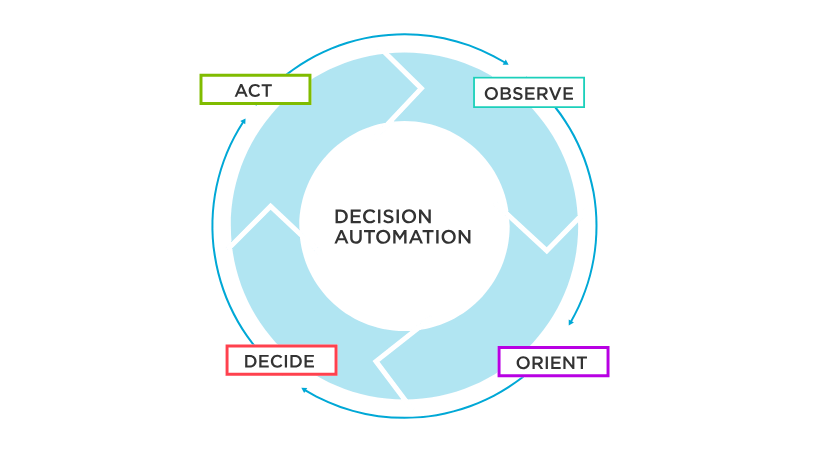
Before we build any automation, we need to clean house. Ask yourself two hard questions:
-
Does this step actually change the outcome?
-
Do I really need to be the one doing this?
If a step adds no value, delete it. Do not automate it. For the steps that remain, we need to sort them into two buckets:
Bucket 1: The Low-Risk Tasks
These are repetitive things. Answering FAQs, scheduling meetings, sending invoices.
-
Verdict: Business automation handles these completely.
Bucket 2: The High-Stakes Tasks
These require your taste, your judgment, or your empathy. Handling an angry client or closing a big deal.
-
Verdict: AI supports you here, but you make the final call.
This is the secret sauce. We are not trying to replace you. We are trying to remove the noise so you can focus on the signal.
IV. Why Real Business Automation Needs an App Instead of a Chatbot?
We have our process mapped out. We have cleaned up the waste. Now, where do we put this system? Most people stay in the chat window (like ChatGPT).
Here is the truth: Chat windows are bad for running a business. Chat is great for brainstorming, but it has no memory of “state.” It doesn’t know which client is waiting for a quote and which one has already paid.
To run a real business automation system, you need structure. You need tables, buttons, and status tags. You need an App.
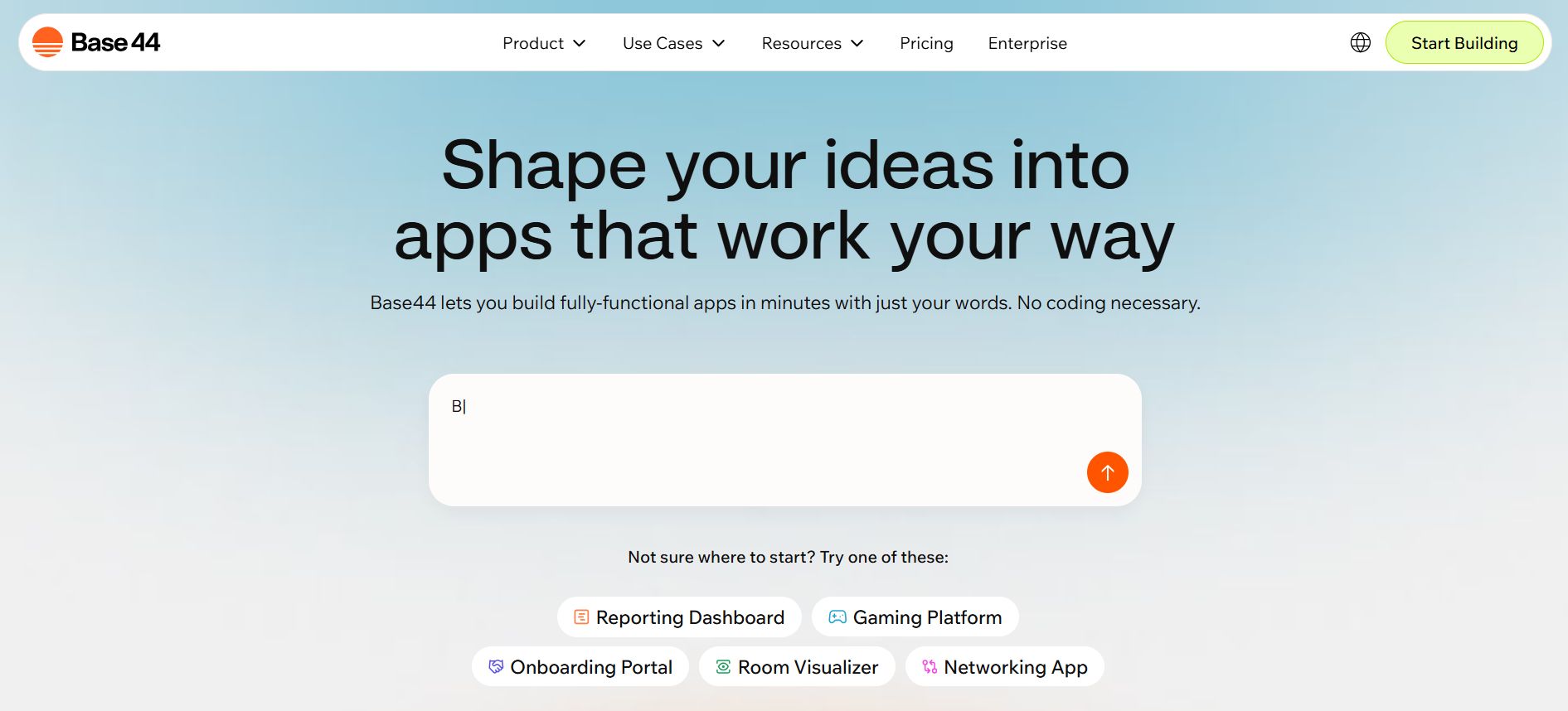
In the past, building an app cost $20,000 and took three months. Today, we can use no-code platforms like Base44 or Google AI Studio to build one in about 10 minutes.
Why use a platform like Base44?
-
Structure: It keeps your data organized in rows and columns.
-
Consistency: It forces the process to happen the same way every time.
-
AI Integration: You can embed AI right into the buttons.
Instead of typing a prompt every time, you just click “Reply,” and the system does the work. This is how you move from “playing with AI” to “running a company with AI.”
V. Steps to Build Your First Business Automation Tool
We are going to build a simple app to solve the “forgotten lead” problem. We will call it Follow-Up Hero. The best part is that programming skills are entirely optional. If you can write a sentence in everyday language, you can build this app.
Phase 1: The Structure
To put this into practice, we will use Google AI Studio. This tool allows us to turn simple text instructions into a fully functional web application in seconds.
Open the Google AI Studio interface. In the prompt area (or Code Assistant), type the following command to define your data structure:
I want to build a CRM for my consulting business.

Please create a table called 'Leads' with these fields: Client Name, Source (IG, Email), Message Content, Status (New, Replied, Won), and Urgency Level.

Also, give me a 'Tasks' table to track my to-do list.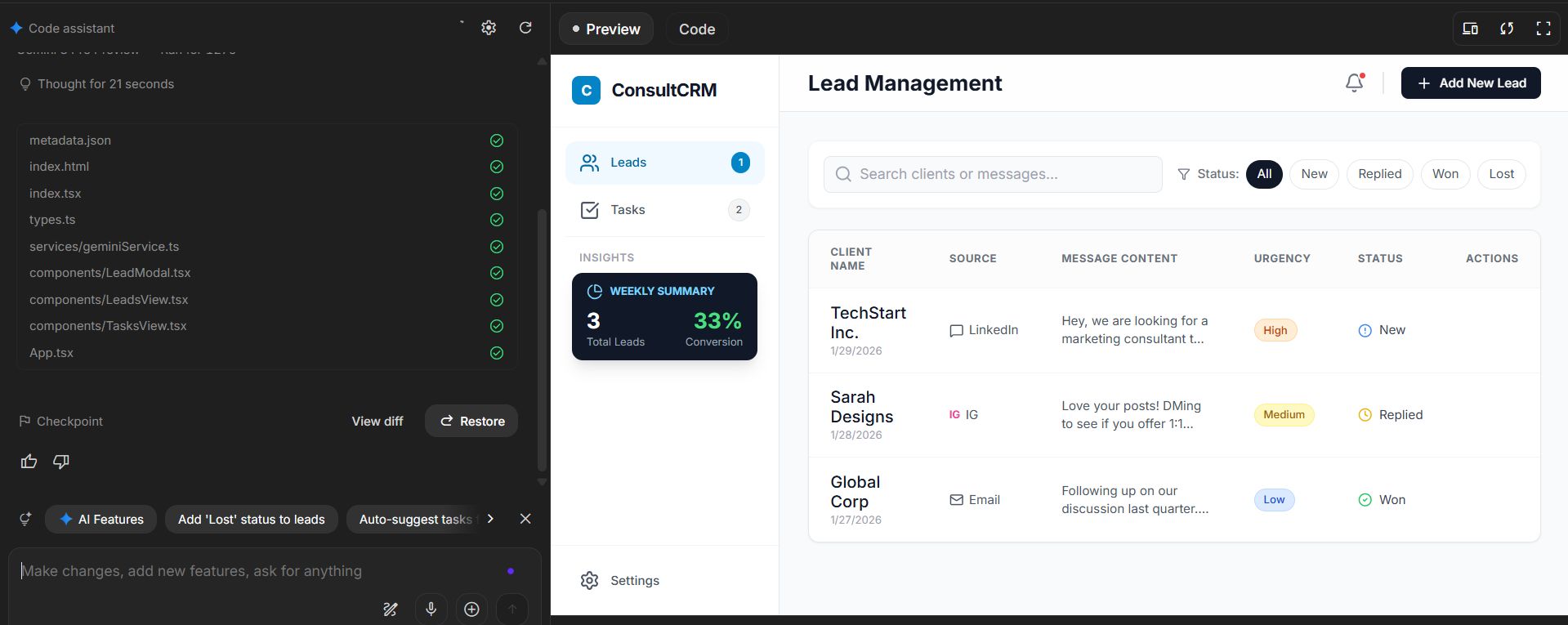
The AI will instantly generate the database. You will see your tables appear like magic.
Phase 2: The Intelligence
Now, let’s add the brain. We want AI to write our emails for us.
Add a button to the Lead view called 'Draft Reply'.

When I click it, use AI to read the 'Message Content'.

Then, write a friendly, professional response and save it in a new field called 'Draft'.

I want to review it before it sends.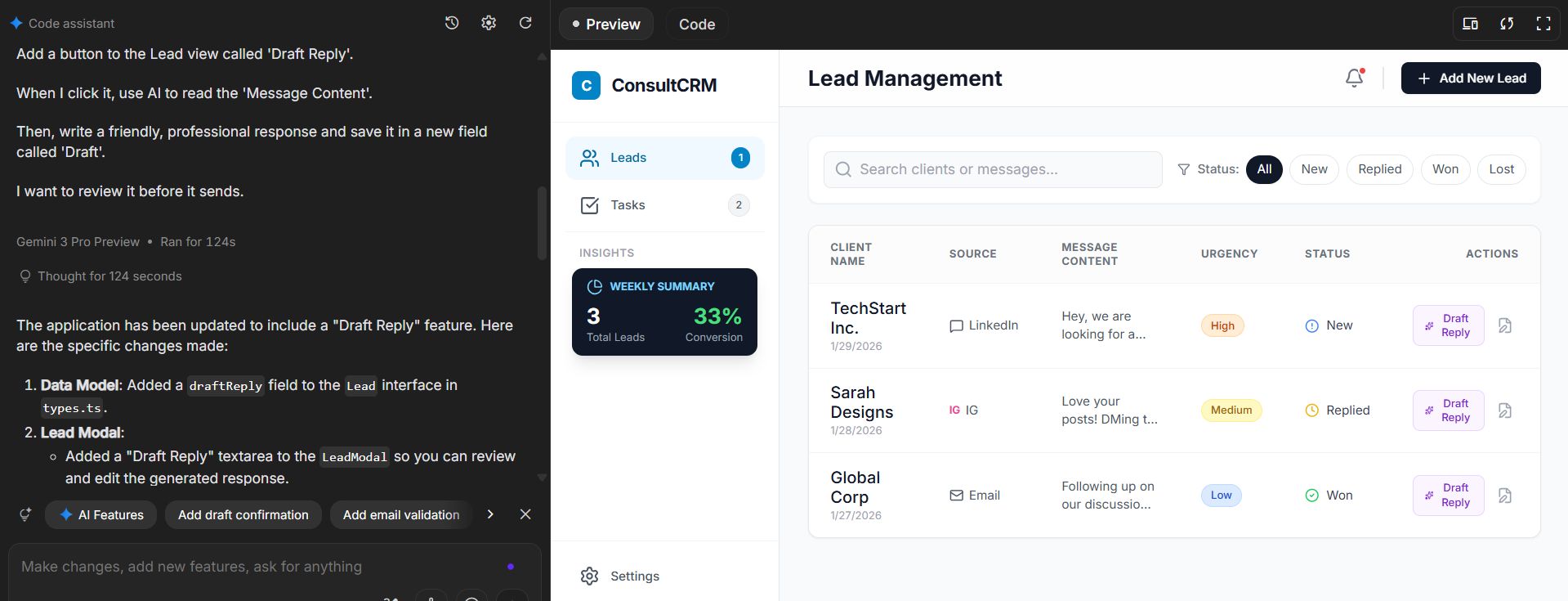
This is the game-changer. Now, when a lead comes in, you don’t stare at a blank screen. You click a button, get a 90% perfect draft, tweak it, and send.
Phase 3: The Look and Feel
Finally, let’s make it nice to look at.
Create a dashboard with big cards at the top.

Show me: 'New Leads Today' and 'Urgent Follow-ups'.

Make the design clean, with a blue and white color scheme.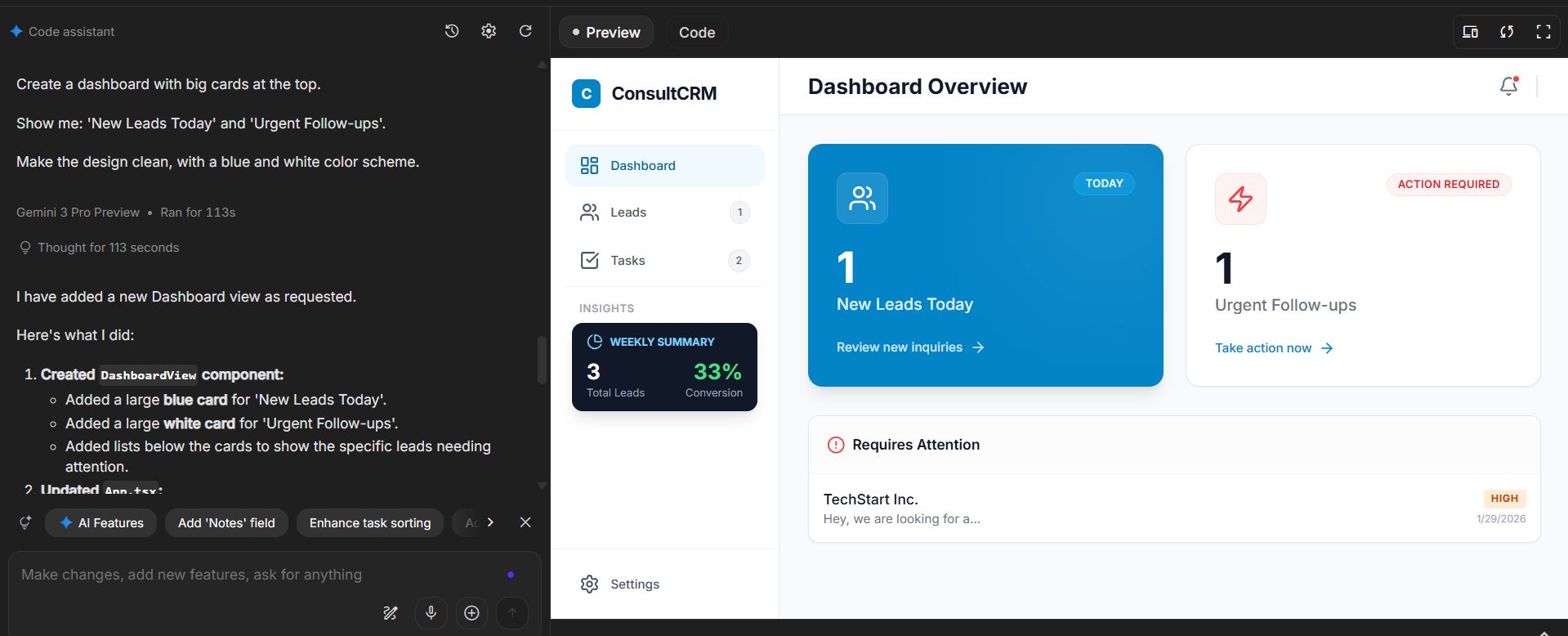
In less than 5 minutes, you have a professional tool. It tracks your leads, writes your emails, and reminds you to follow up. This is the power of modern business automation.
VI. Optimizing and Expanding Your Automation System
Congratulations! You have built your first tool. But the work isn’t quite done. The best systems are living things. They grow and change with you.
First, test it with sample data.
Don’t connect it to your real customers immediately. Put in some fake leads. Click the buttons. Does the AI sound like you? Is the flow smooth?
Next, Iterate.
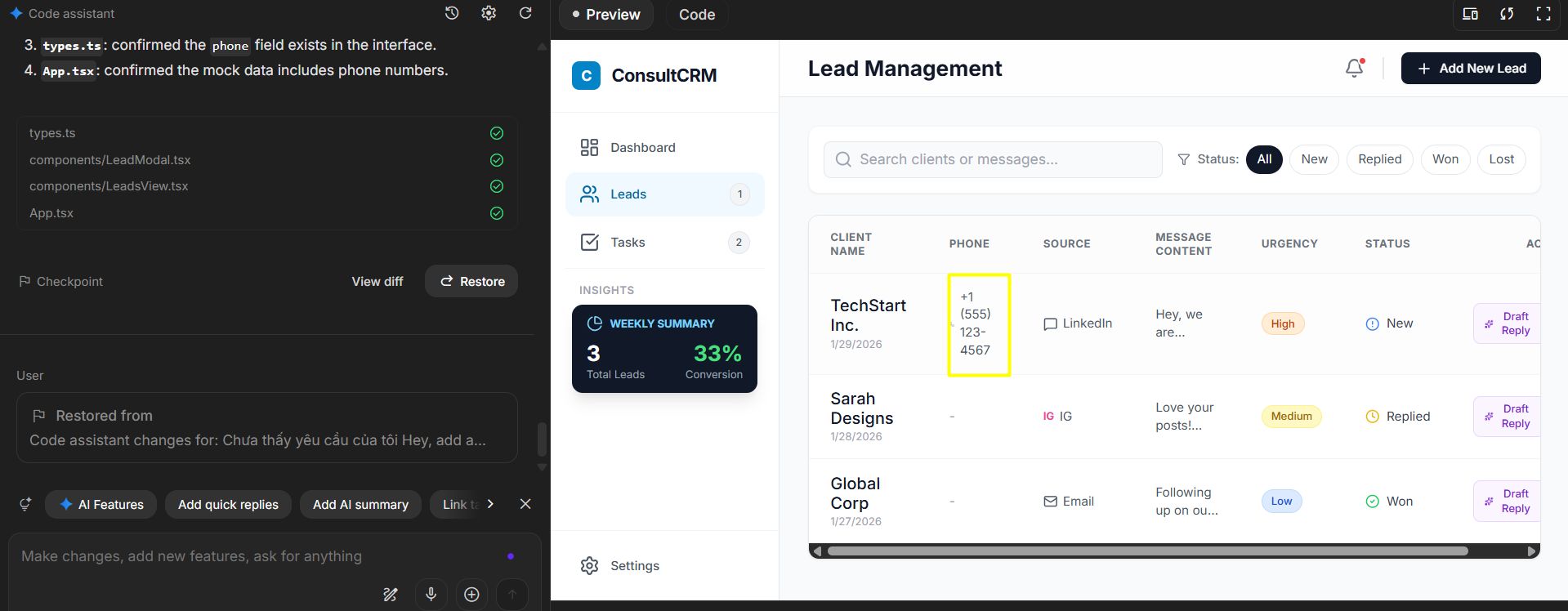
You might use it for a few days and realize, “Oh, I need a field for phone numbers.” That is the beauty of this approach. You just ask the AI: "Hey, add a Phone Number field to the Leads table." And it is done instantly. You are the architect of your own software.
Finally, Integrate. Once you trust your app, connect it to the real world. You can link it to Gmail, so emails flow in automatically. You can connect it to your calendar. Suddenly, your little app becomes the control center for your entire life.
VII. Common Business Automation Mistakes
I want you to succeed, so let me warn you about a few potholes on this road.
Trap 1: Starting with the Tool. Don’t fall in love with a piece of software and try to force it into your business. Always start with your problem first.
Trap 2: Automating Everything. Just because you can automate it, doesn’t mean you should. High-value relationships need a human touch. Use AI to do the paperwork, so you can do the people-work.
Trap 3: Making it Too Complex. Don’t try to build a system that does everything from payroll to inventory on day one. Start with one process. Maybe just “Lead Follow-up.” Get a quick win. Then build the next thing.
Conclusion
We have covered a lot of ground today. We moved from the frustration of invisible work to the clarity of business automation.
Remember the three steps:
-
Deconstruct: Write it down. See the steps.
-
Triage: Keep the good, throw out the bad.
-
Build: Create a system (an App) to house your process.
This isn’t just about saving an hour a day. It is about mental peace. It is about knowing that no client is falling through the cracks. It is about closing your computer at 5 PM knowing everything is under control.
Here is my challenge to you: Don’t just nod and scroll away. Pick one thing that frustrates you right now. Maybe it’s chasing invoices. Write down the steps on a napkin. Then, go to a tool like Base44 and try to build a simple tracker for it.
You have the power to fix your own workflow. You just need to take the first step. Why not start today?
If you are interested in other topics and how AI is transforming different aspects of our lives or even in making money using AI with more detailed, step-by-step guidance, you can find our other articles here:
-
Building Apps with Bolt: A No-Code Guide to Turning Ideas into Reality
-
Detailed Guide: How To Automatically Get Unlimited High-Quality LinkedIn Jobs*
-
Prompt Engineering Automation: Build a Mini AI Assistant with n8n
-
Discover My Ultimate AI Tools Productivity Kit for 2024*
*indicates a premium content, if any
Leave a Reply