
This 2026 guide shows how to use HeyGen to build a realistic AI avatar that speaks 40+ languages and scales your content while you sleep.. How To Make Money With Ai, Ai Tools, Ai Fire 101, Ai Workflows.
TL;DR BOX
Creating an AI clone in 2026 is a streamlined process using HeyGen that allows you to automate video content in multiple languages with high-quality lip-sync that’s good enough for most types of content. By recording a single 2-5 minute training video, you can build a high-fidelity “Digital Twin” that mimics your voice and mannerisms, effectively removing the need for physical production setups.
This tool enables creators to scale their presence without burnout, translate content into dozens of languages with automated lip-sync and maintain a consistent “camera-ready” look 24/7. Success relies on high-quality training footage and strategic scripting to ensure the avatar sounds natural and engaging.
Key points
-
Fact: The Avatar 4.0 engine by HeyGen provides the most realistic results, including subtle micro-expressions and natural eye behavior that eliminate the “uncanny valley” effect.
-
Mistake: Wearing busy patterns or using erratic hand gestures during the training video; keep movements minimal and wear solid colors for the cleanest AI rendering.
-
Action: Record a 5-minute training video at eye level with natural lighting to serve as the foundation for your high-fidelity video-based avatar.
Critical insight
The real value of an AI clone isn’t just “replacing” you; it’s decoupling your presence from your output, allowing you to publish at a scale and global reach that is physically impossible for a single human.
Table of Contents
I. Introduction: The Clone Wars Are Here

Do you think the creator spent hours making them? The answer is NO. They create these videos in just a few minutes using AI tools.
I’ve tested over 20 AI tools and researched their process to create AI clone videos. I can confidently say that you can 100% create videos like this, or even better.
After that, you can easily upload the video to all major social media platforms like Facebook, YouTube, Instagram, and Facebook Reels, just like they do.
This guide walks through the entire process, from recording your first training video to generating content in multiple languages without hiring translators or voice actors.
Let’s break down exactly how to create your own AI clone, step by step.
II. Why Should You Care About AI Avatars?
Because your human energy is expensive. An avatar lets you produce more videos without needing perfect lighting, makeup, mood or multiple takes. It also helps you keep output consistent even when your real life is messy.
Key takeaways
-
Faster production.
-
Consistent “camera-ready” version.
-
Easy testing of scripts and hooks.
-
Less burnout from filming.
The win isn’t more videos. It’s fewer bottlenecks.
An AI avatar is essentially a high-fidelity digital puppet that looks like you, sounds like you and mimics your unique mannerisms.
You need good lighting, decent audio, the right background and, oh yeah, you actually have to be present and camera-ready. So, what is an AI avatar and why do you need it?
At its core, an AI clone is a model trained on your face and voice.
Unlike the janky, glitchy deepfakes from 2015, modern tools like HeyGen create “Avatar 4.0” versions that are nearly indistinguishable from reality on a mobile screen.
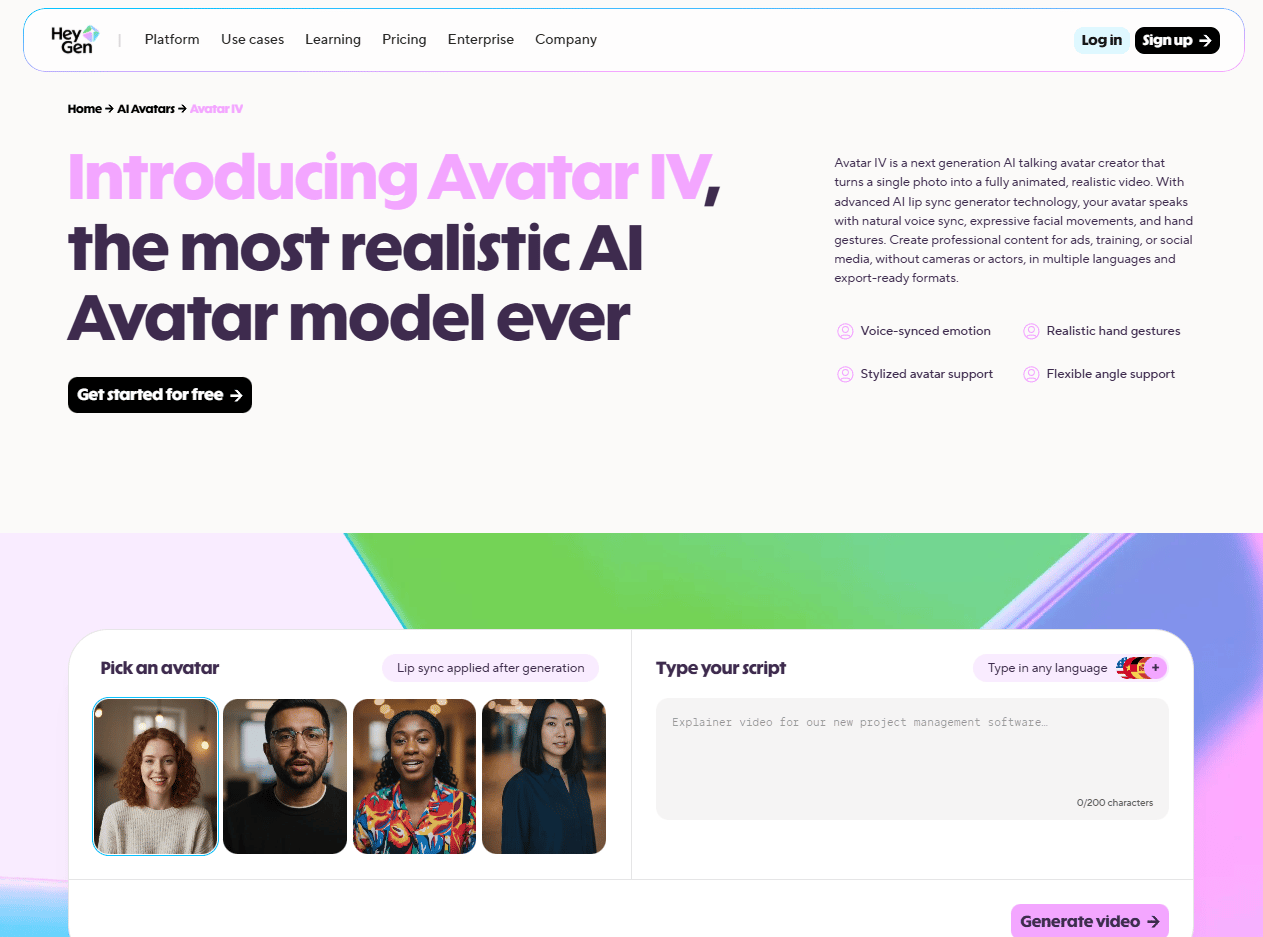
Here’s what changes when you have a working digital clone:
-
Scale your content without burning out. You can “record” 100 videos in the time it takes to type a script.
-
Speak multiple languages fluently (even if you barely passed Spanish in high school).
-
Maintain consistency across all your videos. Your “camera-ready” version is available 24/7, regardless of how tired you actually are.
-
Test content ideas without the full production setup. Now you type a script, hit generate and see the result in minutes. If it doesn’t work, you rewrite and try again.
-
Automate repetitive videos while you focus on strategy.
Think of it as having a tireless video production assistant who happens to look exactly like you. Creepy? Maybe a little but is it useful? Absolutely.
III. What You’ll Need to Get Started
The barrier to entry is surprisingly low. You don’t need a film degree, a production studio or expensive equipment. All you need is the right tool.
Here’s your shopping list:
-
A HeyGen account (Sign up on their site).
-
A decent video of yourself (for the Digital Twin) OR a single photo (for the Photo Avatar).
-
About 10-15 minutes of your time.
-
A willingness to be slightly weirded out by how realistic your clone looks.
That’s the entire list. You don’t have to buy fancy camera equipment, a green screen background or even a film degree to get started.
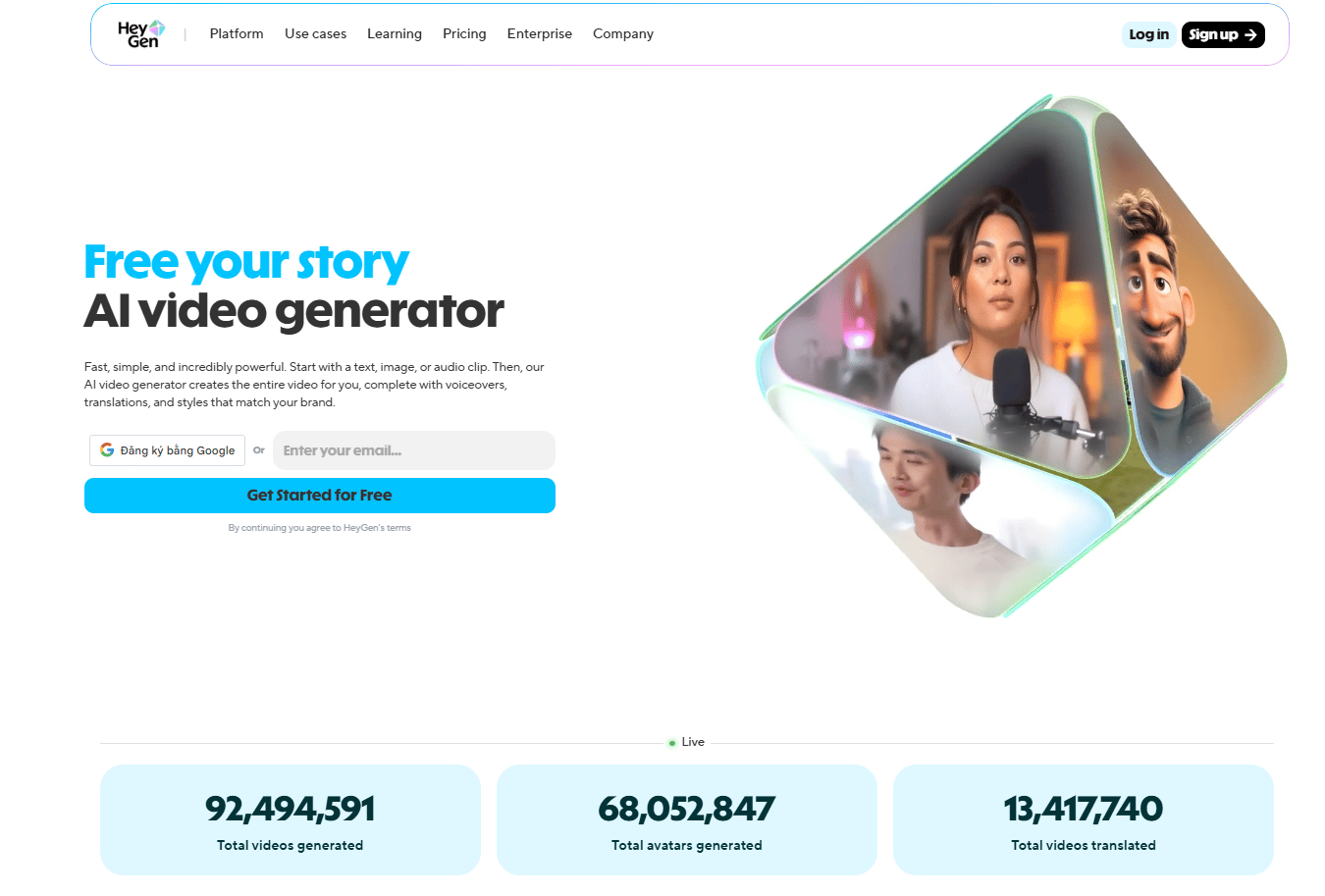
Before going deeper, pause here and do the 10-minute Quick Start. You don’t need to understand everything yet. Once you see your own AI clone speaking naturally on screen, the rest of the guide will make sense immediately. Get the first version working, then optimize.
IV. Step 1: Set Up Your HeyGen Account
First things first, head over to HeyGen and create an account. The platform offers both free and paid tiers but if you’re serious about this, you’ll want to invest in one of the paid plans to unlock the really good stuff.
Once you’re in, you’ll see the main dashboard. This is your mission control for creating AI avatars, generating videos and generally feeling like you’re living in a Black Mirror episode (but the fun kind).

Learn How to Make AI Work For You!
Transform your AI skills with the AI Fire Academy Premium Plan – FREE for 14 days! Gain instant access to 500+ AI workflows, advanced tutorials, exclusive case studies and unbeatable discounts. No risks, cancel anytime.
Start Your Free Trial Today >>
V. Step 2: Create a Video-Based Avatar (The Gold Standard)
If you want people to actually watch your content, you cannot settle for a static photo. You need the “Digital Twin“. This is the highest-quality version because it captures your actual facial movements, voice patterns and mannerisms.
1. Recording Your Training Video
You are the teacher here and the AI is your student. If you give it a bad lesson, you get a bad clone. To do this right, you must record a 2-5 minute “consent and training” video.
-
Find a quiet space with good lighting.
Natural light works best but any decent lighting will do. Try not to look like you are being questioned in a noir movie. You don’t want your AI clone to look perpetually suspicious, right?
-
Position your camera at eye level.

This is crucial. Nobody wants to see your AI clone with a weird chin angle because you propped your phone on a stack of books. If your eyes wander, your avatar will look distracted and untrustworthy. You should be looking straight into the lens, not up or down.
-
Record yourself reading a script.
HeyGen provides a consent script that you’ll need to read. This serves two purposes: it trains the AI on your voice and facial movements and it confirms you’re creating an avatar of yourself (not impersonating someone else).
This script usually takes 2-5 minutes to read. Speak clearly, maintain natural expressions and try not to look like you’re being held hostage.
Those are the basics. Here are a few pro tips that make a real difference:
-
Smile naturally: Your avatar will mimic your baseline expression, so if you look grumpy in the training video, your clone will be perpetually annoyed at the world.
-
Minimize hand gestures: Keep your hands relatively still. Crazy movement can confuse the AI and lead to weird artifacts in the final avatar.
-
Wear something neutral: Solid colors work best. Avoid busy patterns that might cause visual glitches.
-
Test your audio: Clear audio helps the voice cloning work better. If you have an external microphone, use it. If not, make sure you’re in a quiet room with minimal background noise. Close windows, turn off fans and silence your phone.

2. Uploading Your Video
Congratulations, you have done the hardest part in the entire workflow. I know sometimes you don’t like to record yourself but you did it. That’s awesome. So, once you’ve got your recording:
-
Inside your HeyGen dashboard, click on “Avatars” in the main menu.
-
Click “Create Avatar” and select “Digital Twin”.

-
Upload your video file (most formats work fine, like MP4, MOV, AVI,…).

-
Wait for the AI to process it (this usually takes 10-30 minutes, depending on the length).

Go grab a coffee or check your email. When you come back, your digital twin will be waiting. It’s like magic but with more machine learning.
Once processing finishes, you’ll have a reusable avatar that looks like you, sounds like you and can generate unlimited videos. This is the asset you’ll use for everything that comes next.
VI. Step 3: Create a Photo-Based Avatar (The Quick Option)
Don’t have time to record a full video? Don’t worry, HeyGen also offers a photo-based avatar option that’s surprisingly good, though not quite as realistic as the video version but it’s surprisingly good for quick projects.
1. Choosing the Right Photo
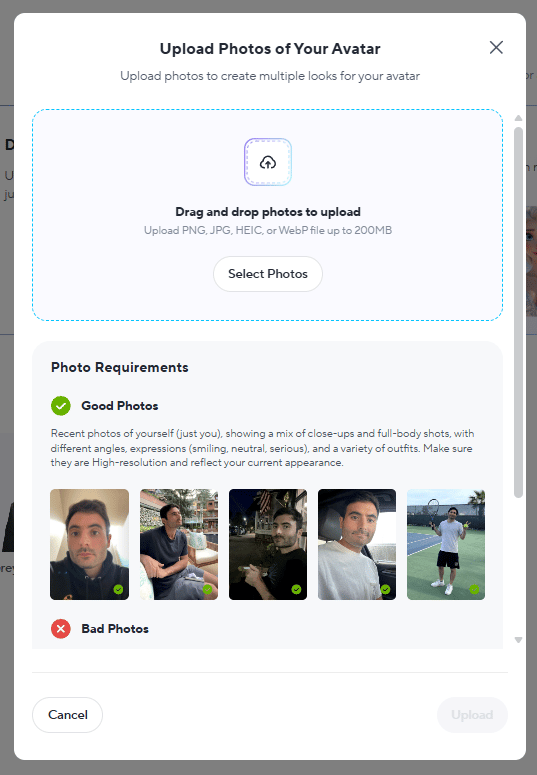
The quality of your source photo directly impacts your avatar quality. Here’s what works:

-
High resolution: The better the photo quality, the better your avatar.
-
Good lighting: Again with the lighting. It matters.
-
Neutral background: Plain walls work great.
-
Direct gaze: Look straight at the camera.
-
Natural expression: Try to look natural, so your avatar does not look like a boring ID photo.
2. Creating Your Photo Avatar
The process is similar to the video-based avatar.
-
You go to “Avatars”, hit the “Create Avatar” button.
-
Select “Photo Avatar”.

-
Upload your photo. HeyGen accepts most common formats (JPG, PNG).
-
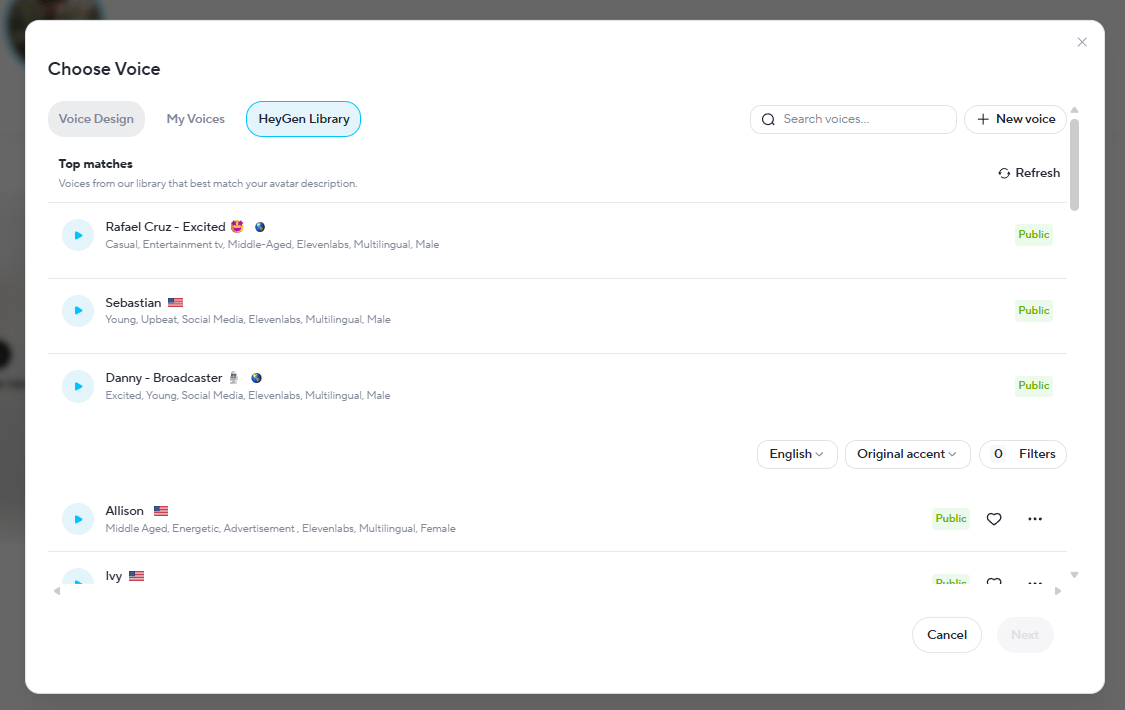
Choose a voice (you can use a preset or clone your own voice separately).
-
Wait for processing (faster than the video option, usually 5-10 minutes).
Here’s the honest breakdown:
-
Use Photo-Based When: you need an avatar quickly for testing, create one-off content, don’t have time to record properly or experiment with the technology.
-
Use Video-Based When: you’re building a brand, creating content you’ll use repeatedly, creating client-facing content or want maximum realism.
The video version takes more initial time but produces noticeably better results. If this avatar will represent you in public-facing content, invest the extra time in the video-based version.
VII. Step 4: Generate Your AI Videos
What do you do after you create your AI Avatar? Of course, you make it move but not with After Effects or any motion graphics software. You could do that automatically by using HeyGen.
Now, let’s see how it works.
1. Creating a Video with Your Avatar
First, you open HeyGen and start a new project, then you follow these:
-
Click on “Create in AI Studio” from the dashboard.

-
Select your avatar from your custom avatars library.

-
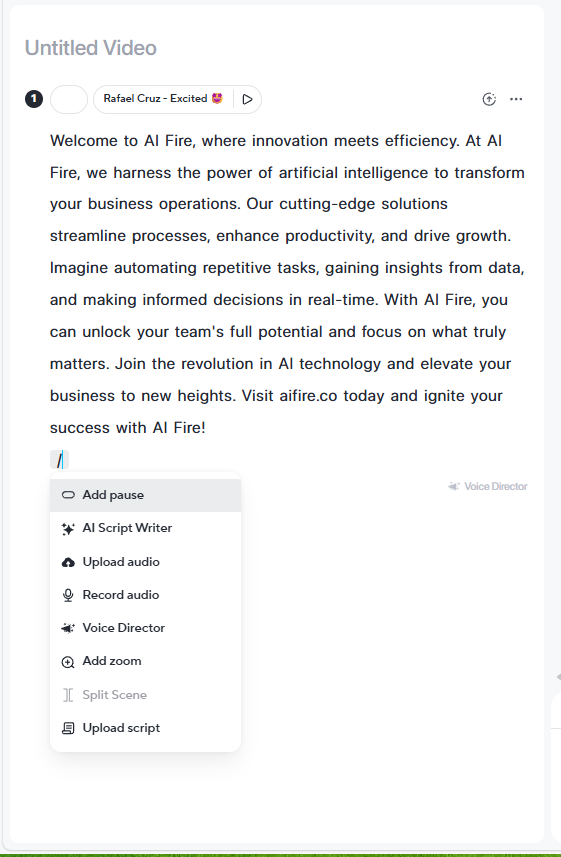
Write or paste your script. This is what your avatar will say.
-
Choose your settings:
-
Voice: Use your cloned voice or select from preset options.
-
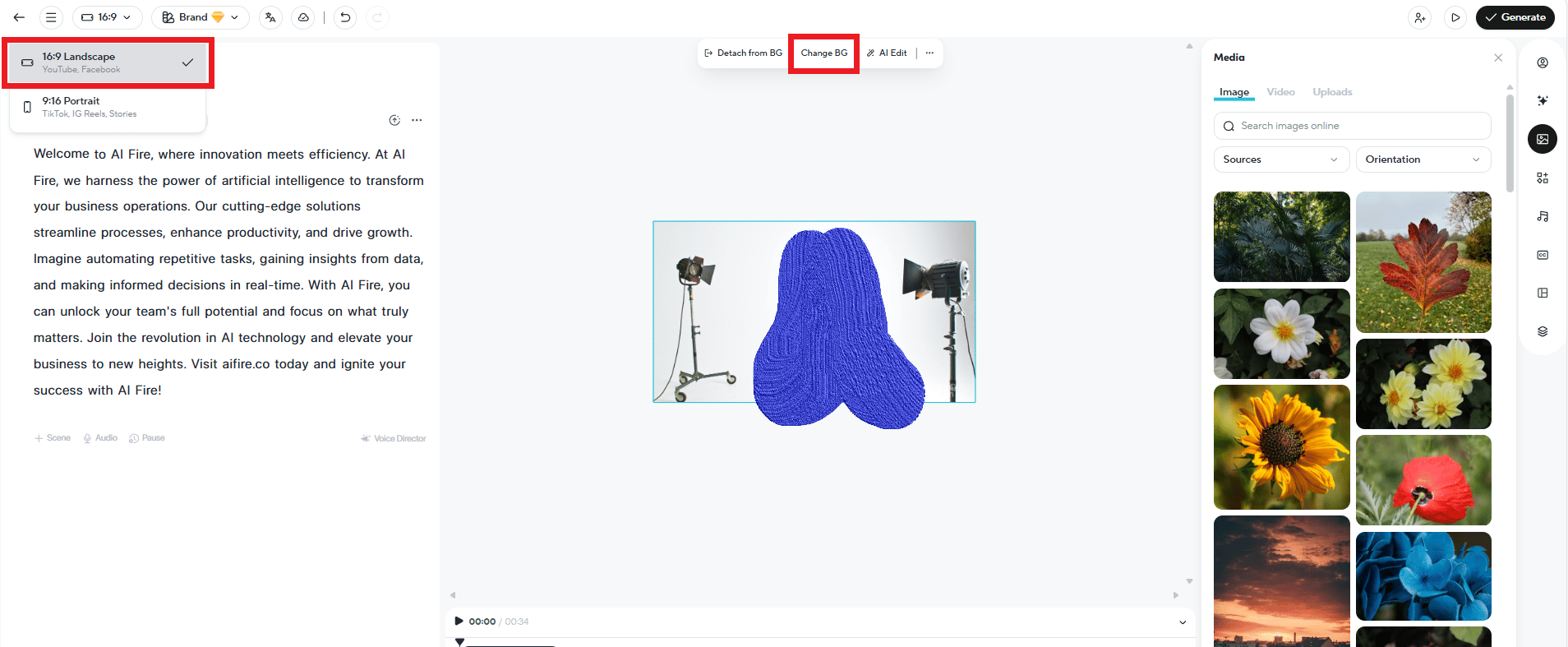
Background: Upload a custom background or use HeyGen’s templates.
-
Aspect ratio: Choose based on your platform (16:9 for YouTube, 9:16 for TikTok/Reels, etc.).
-
Hit “Generate” and wait a few minutes.
When it’s done, you can preview, download or regenerate with changes.
When I first tested this, the biggest surprise wasn’t the realism; it was how much time it freed up once filming wasn’t the bottleneck.

2. Scripting Tips for Natural Results
Your avatar reads exactly what you write. So, usually, it sounds very AI, unnatural; it’s even worse than hearing how to pronounce each word from a 5-year-old.
That means scripting matters more than you might think and there are tricks to make it sound more natural:
-
Use punctuation strategically.
Commas create pauses, periods create stops. You can use them to control pacing.
Here is an example: Instead of writing “Welcome to AI Fire”. (Quick, matter-of-fact) You use commas to make it slower and more dramatic: “Welcome to… AI Fire”.
-
Write how you actually talk.
Conversational language works better than formal. Make sure you read your script out loud before generating. If it sounds weird when you say it, your avatar will sound weird too.

-
Add emotional cues (Optional)
While HeyGen’s AI is smart, it helps to add notes like [pause], [enthusiastic] or [serious] if you want specific delivery. These work better with the video-based avatar since it has more training data on your natural expressions.

-
Test short scripts first.
You can generate a 30-second test clip before committing to a 10-minute video. Make sure the voice, pacing and overall feel match what you want. It’s easier to fix issues in a short test than after rendering a long video.
3. Comparing Avatar Quality Options
HeyGen gives you options and the difference is real.
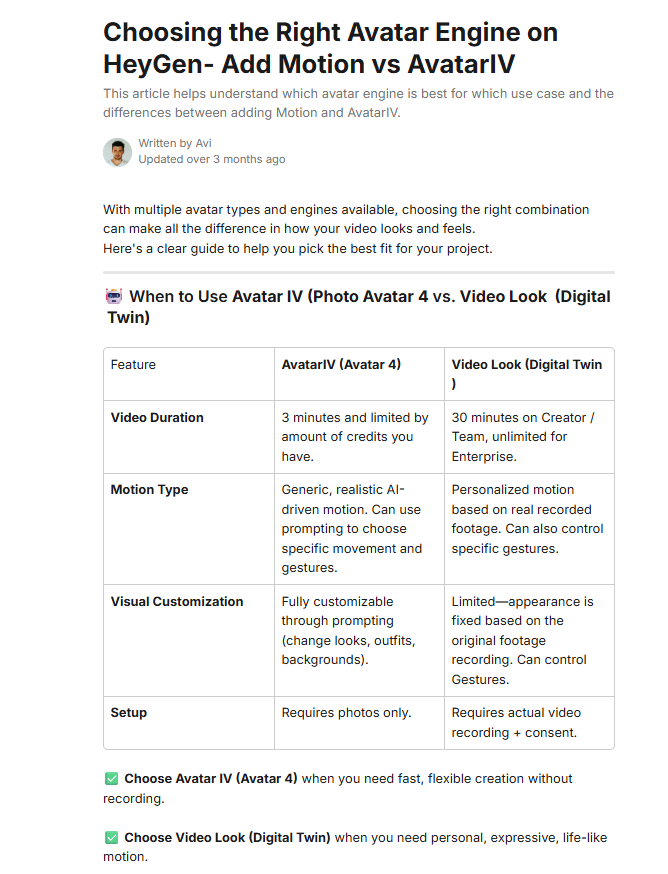
-
Avatar 4.0: The latest avatar engine has subtle facial movement, natural eye behavior and small expressions that feel human. It’s the version that makes people look twice.
-
Unlimited/Standard: This standard engine still looks good. Slightly less detail but strong enough for most content, especially on mobile.
Source: HeyGen.
If you’re building something long-term and public-facing, Avatar 4.0 is worth it. If you’re testing ideas or creating internal content, the standard option does the job without friction.
VIII. Can Your Clone Really Speak Other Languages?
Yes, through video translation: your speech is translated and the lips are re-synced. It’s strongest with simple, direct language. Slang and cultural jokes can get weird, so keep scripts clean if you’re scaling globally.
Key takeaways
-
One script → many languages
-
Simple language translates best
-
Native review helps for high-stakes content
Global scale comes from script discipline.
Here’s where things get really wild. Remember how I said your avatar can speak languages you don’t know? You can take a video of your clone speaking English and, with one click, translate it into Japanese, Arabic or French. This is how.
1. Using HeyGen’s Video Translation Feature
Here’s the process:
-
Start with a video featuring your avatar speaking in your native language.
-
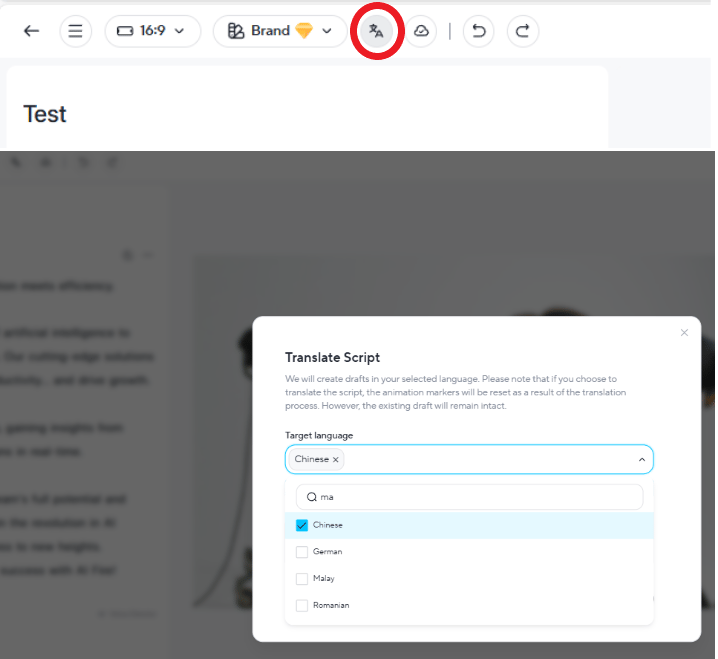
Then, navigate to the “Video Translate” feature. This is separate from the regular video generation tool.
-
Select your target language (Spanish, French, Mandarin, Japanese, Arabic,… you name it). HeyGen supports all major languages plus many regional dialects.
-
Hit translate and wait.
You want to know what happens behind the scenes; you got me. HeyGen’s AI does three things simultaneously:
-
Your avatar’s lips sync perfectly to the translated language.
-
The voice maintains your tone and cadence.
-
The timing adjusts naturally for the new language.
The result is a video where your avatar speaks fluent Mandarin with perfect lip-syncing, even if you do not know any Chinese.

2. Why This Changes Everything
This allows you to reach global audiences much faster without hiring a single translator. If you create content, this removes a wall that used to be expensive and slow. One English video becomes ten videos in ten different languages.
This matters for education, product demos and tutorials. Markets that were out of your reach suddenly become accessible. Now you can reach new audiences, new revenue streams with the same core content, just different language.
And the cost difference is massive. Traditional video translation can cost hundreds or thousands per video. Here, it happens in minutes for a fraction of that. How cool is that?
Creating quality AI content takes serious research time ☕️ Your coffee fund helps me read whitepapers, test new tools and interview experts so you get the real story. Skip the fluff – get insights that help you understand what’s actually happening in AI. Support quality over quantity here!
3. A Few Things to Keep in Mind
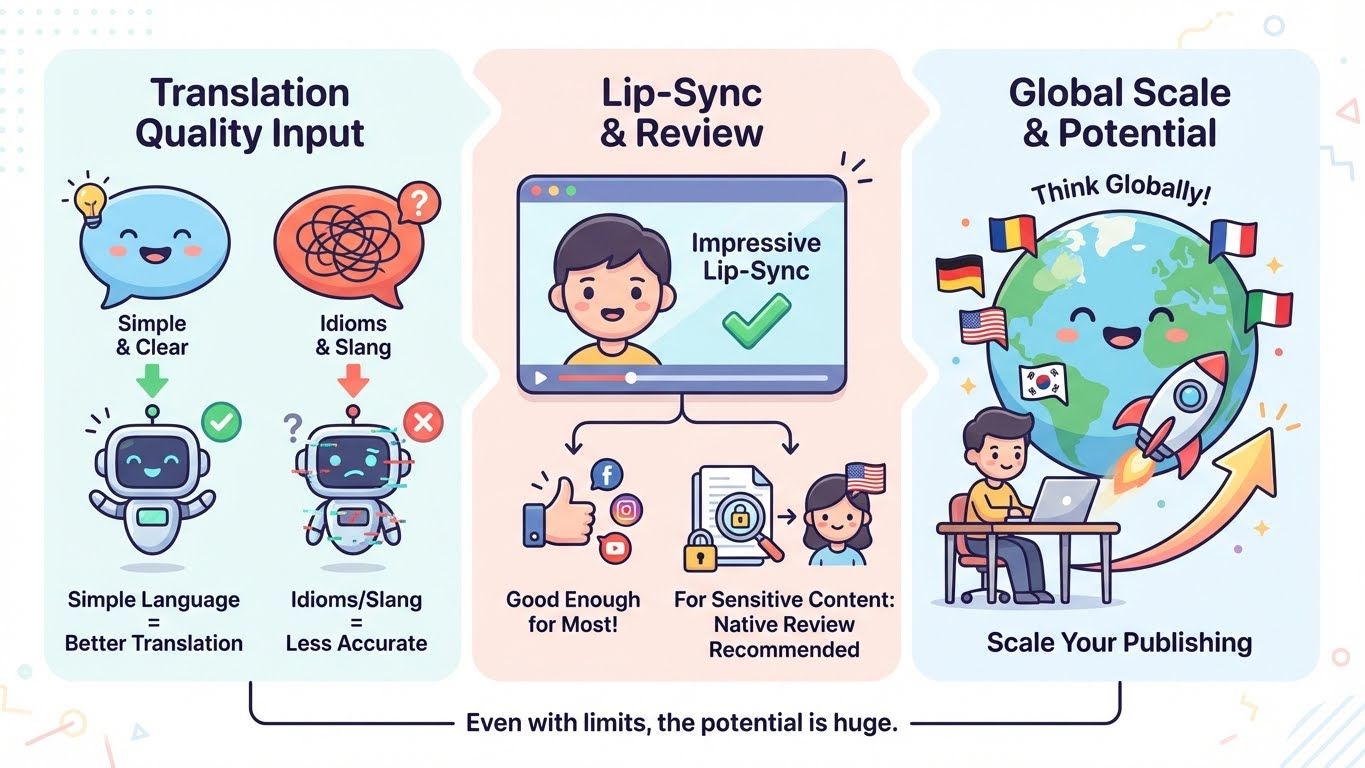
The translation quality depends on the complexity of your script. When you use simple, clear language, HeyGen translates better than idioms, slang or culturally specific references. If you’re planning to use translation heavily, write scripts that are straightforward and universal.
Also, while the lip-sync is impressively good, native speakers might catch small details. For most use cases, it’s more than good enough. But for highly sensitive or official content, a quick review by a native speaker is still a smart move.
Even with those limits, this feature changes the scale of what one person can publish. You can start thinking globally.
IX. What’s The Best Way To Use An AI Clone Without Selling Your Soul?
Use it for repeatable production, not for your core human moments. Keep your real perspective, opinions and decisions as the “source.” Let the clone handle delivery when filming would slow you down.
Key takeaways
-
Clone does output, you do meaning.
-
Use for tutorials, explainers, FAQs.
-
Keep real you for story + emotion.
-
Mix avatar + real footage.
The clone scales your consistency. Only you scale trust.
Even the best tech can look “creepy” if handled poorly. Here is how to stay on the right side of the uncanny valley.

-
The “Disclosure” Rule:
Always tell your viewers when they are watching an AI video. Do not worry about their reaction. Actually, your audience deserves transparency. You don’t need to announce it in every video but make it known somewhere that you use AI avatars. Most viewers won’t care as long as you’re honest about it.
-
Avoid High-Emotion Content:
If you are sharing a deeply personal, heartbreaking story, do it yourself. AI clones are great for education and marketing but they should not be misused. There are serious rules about this.
Also, don’t create deceptive content. The technology is a tool; you must use it in the right way.
-
Remember the Human Element:
AI should enhance your content, not replace genuine connection. Your audience follows you for your perspective, your insights and your personality. The avatar is a production tool, not a substitute for your authentic voice.
HeyGen requires you to record a consent video for a reason. It ensures you’re creating an avatar of yourself, not someone else. This built-in safeguard is important and should be respected.
X. Final Thoughts: Is This the Future?
After walking through this entire process, one thing becomes clear: AI avatars are not a novelty. They’re a legitimate production tool that is already changing how content gets made.
Will AI avatars completely replace human creators? Absolutely not. But will they become a standard tool in the content creation toolkit? Almost certainly.
You must use this technology thoughtfully. Your AI clone should amplify your voice, not replace your authenticity. It is suitable for scaling the repetitive stuff so you free up your brain for high-level strategy and creativity.
So, go ahead and create your digital twin. Use the clone to make the videos but keep the ideas and decisions human.
If you are interested in other topics and how AI is transforming different aspects of our lives or even in making money using AI with more detailed, step-by-step guidance, you can find our other articles here:
Leave a Reply