
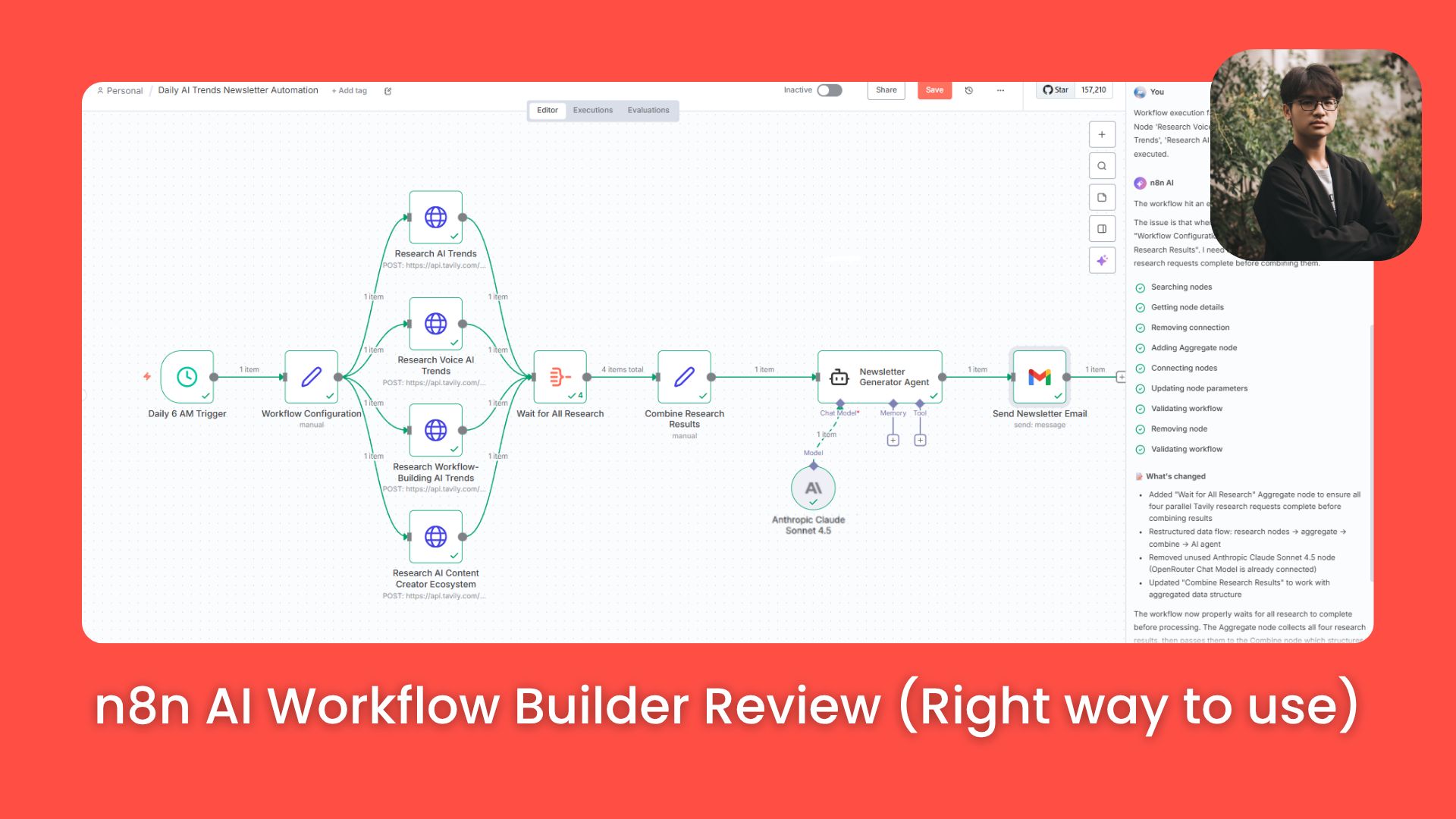
Is n8n’s new AI builder a magic wand or a mess? We stress-tested it with 4 complex workflows. Here’s what works, what breaks and why you still need to learn the basics.. Prompt Engineering, Ai Automations, Ai Workflows.
TL;DR BOX
n8n’s AI Workflow Builder is a powerful skeleton generator that accelerates building but cannot replace manual automation knowledge. It successfully drafts workflows in seconds but requires human intervention to fix configuration errors and API details.
This guide analyzes four real-world stress tests, revealing that the AI struggles with hidden API settings and complex branching logic. While it excels at creating structures, it often fails to map variables or toggle necessary options without explicit instruction.
Readers will learn to use detailed, linear prompts to minimize errors and use the AI as a debugging partner rather than a complete builder.
Key points
-
n8n cloud plans impose strict monthly credit limits on AI generation usage.
-
Avoid vague prompts, which cause the AI to hallucinate over-engineered, broken architectures.
-
Force the AI to build linear, sequential workflows to prevent data merging errors.
Critical insight
The AI functions best as a troubleshooting assistant that identifies variable mismatches, rather than a “set and forget” creator that handles third-party API issues autonomously.
Table of Contents
I. Introduction: The Promise vs. The Reality
You’ve probably heard the pitch: AI that builds automations for you. Just describe what you want in plain English and watch as a complex AI workflow appears fully formed, with no coding, no technical knowledge and no learning curve.
Sounds perfect, right?
I’m here to tell you the truth. I’ve spent years building AI automation businesses and I recently put n8n‘s new AI Workflow Builder through a thorough, real-world stress test. I didn’t use cherry-picked examples that magically work. I showed the raw truth: what works, what breaks, how to troubleshoot and, most importantly, why learning to build an AI workflow manually still matters, even when AI can supposedly do it for you.
This guide breaks down exactly what I discovered across four live builds, complete with all the failures, fixes and expert lessons you need to actually use these tools in practice.

II. What Is the AI Workflow Builder?
n8n’s AI Workflow Builder is a text-to-automation feature that lives inside the platform. Instead of manually adding nodes and configuring connections, you describe your AI workflow in natural language and the AI generates it for you.
-
The Promise: Turn hours of complex AI workflow building into minutes of simple prompting.
-
The Reality: It’s a powerful accelerator but it’s not a magic wand. It requires guidance, troubleshooting and a human who understands the fundamentals.

III. Demo 1: The Daily Newsletter (Why Details Matter)
Let’s start with something practical: a morning automation that researches trends and sends you useful information to start your day.
1. The Prompt
I need a workflow that runs every morning. It should research the latest trends in the tech industry using Tavily. Then it should use Perplexity to find one emerging AI tool worth exploring for the day. It must also include a short productivity quote.
Send everything to my email: aifire@example.com.
Simple, clear, actionable. What could go wrong?
2. What the AI Built
Within seconds, n8n generated a visually perfect workflow:
-
Schedule Trigger: Set to run every morning.
-
Tavily Node: Configured to search “latest trends in the tech industry”.
-
Perplexity Node #1: To find an emerging AI tool.
-
Perplexity Node #2: To generate a short productivity quote.
-
Email Node: To deliver everything.
Visually, it looked flawless. The nodes were connected logically.

3. The Execution Test
I hit “Execute” to see what would actually happen.
-
Result: No errors thrown. Everything appeared to work.
-
What Actually Arrived:
-
❌ Tech trends research: error.
-
❌ Emerging AI tool: Missing.
-
❌ Motivational quote: Missing entirely.
-


Learn How to Make AI Work For You!
Transform your AI skills with the AI Fire Academy Premium Plan – FREE for 14 days! Gain instant access to 500+ AI workflows, advanced tutorials, exclusive case studies and unbeatable discounts. No risks, cancel anytime.
Start Your Free Trial Today >>
4. The Investigation
Why did Tavily appear to work but produce no output?
-
The Culprit: A hidden configuration issue.
-
The Root Cause: Tavily has an optional setting called “Include Response” that generates a summary of search results. Unless you explicitly enable this, the
answervariable simply doesn’t exist. The AI Workflow Builder had tried to reference a variable that wasn’t there.

Also, the “Compose Email Content” node doesn’t pull the right elements from the input, so the context of the email is wrong.

5. The Fix & Lesson
-
The Fix: I manually enabled “Include Response” in the Tavily settings, chatted with the AI Builder about the “Compose Email Content” node and re-ran the workflow.
-
The Lesson: n8n’s AI understands n8n nodes perfectly but it struggles with the specific quirks of third-party APIs. It doesn’t always know which optional settings must be enabled to get the data you want. This is why you still need to know how to check node settings.


IV. Demo 2: The Sales Brief Generator (Troubleshooting with AI)
Let’s try something more complex: a form-triggered workflow that researches leads and generates sales briefs.
1. The Prompt
Create a workflow that triggers whenever a lead submits a form.
Use the form fields (business details + what support they want) as input.
The workflow should automatically research the company using Perplexity, identify their likely pain points and produce a concise one-page sales brief I can use during the call.
2. What the AI Built
-
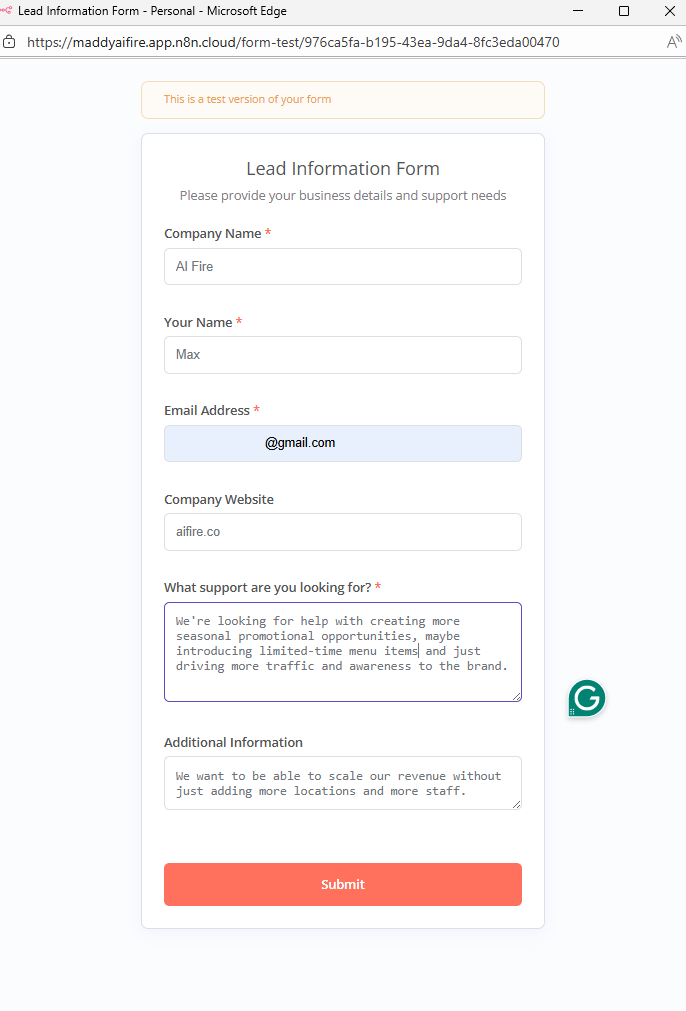
Form Trigger: With fields for Company, Contact, Email, Industry and “Biggest Challenges”.
-
AI Agent Node: A “Generate Sales Brief”.
-
Google Sheet: Where lead data should be stored.
-
Perplexity Node: Connected to the agent for research.

3. First Execution & Failure
I filled out the form for AI Fire as a test case.
-
The Problem: The Perplexity node errored out because it was using the wrong model.

4. Troubleshooting with AI
Instead of manually debugging, I used the AI builder as a troubleshooting partner.
-
My Prompt: “This is what the agent output: [pasted output]. Help me fix this”.
-
The AI’s Diagnosis: Updating “Workflow Configuration” node parameters.
-
The Result: It identified a variable name mismatch that I might have missed.

5. The Fix & Result
After fixing the variable names, I re-executed.
-
✅ The Perplexity node was called once.
-
✅ The agent received all form data correctly.
-
✅ It generated a comprehensive sales brief with company overview, pain points and strategic questions.

The Lesson: Even native n8n nodes can have variable mismatches. But the AI builder itself is a powerful debugging partner. You can show it errors and it can often fix its own mistakes.
V. Demo 3: Multi-Agent Research (The Failure)
n8n provides preset example prompts. I tested one: a multi-agent research system.
1. The Preset Prompt
Build a multi-agent setup that can look into a subject, confirm what’s accurate and pull the results together into a final document. Let the agents interact naturally so they complement each other’s work.2. Why This Failed
This prompt is extremely ambiguous. It leaves everything open to interpretation: What triggers it? What data sources? What format is the report?
-
What the AI Built: An overly complex, confusing workflow with an orchestrator agent, multiple sub-agents, manual triggers and complex branching logic.
-
The Result: It errored out immediately on the first, second and third executions.

The Lesson: Vague prompts lead to over-engineered, broken solutions. If you don’t give the AI constraints, it will hallucinate a complex architecture that doesn’t actually work.
VI. Demo 4: The Detailed Newsletter (The Success)
Learning from the previous failure, I tried again with a far more detailed prompt.
1. The Detailed Prompt
Build a workflow for a Personal Daily Newsletter that triggers every day at 6:00 AM.
Steps:
1. Use Tavily (Advanced Search Depth, include answer) to research:
- AI trends
- Voice AI trends
- Workflow-building AI trends
- The AI content creator ecosystem
2. Pass all Tavily results into an AI agent using Anthropic Claude Sonnet 4.5.
3. Have the agent generate a well-structured HTML newsletter summarizing the findings.

Send that HTML newsletter via a Gmail node to aifire@example.com daily.
2. What This Prompt Specifies
Notice the difference?
-
Trigger: Schedule (6 AM).
-
Data Source: Only Tavily (no confusion).
-
Configuration: Advanced depth, “Include Response” enabled (fixing the Demo 1 error!).
-
Model: Claude Sonnet 4.5.
3. What the AI Built
It built a clean, linear workflow:
-
Schedule Trigger.
-
Tavily Search #1 (AI trends).
-
Tavily Search #2 (Voice AI).
-
Tavily Search #3 (Workflow trends).
-
Tavily Search #4 (AI content creator ecosystem)
-
AI Agent (Newsletter creator).
-
Email Delivery.

4. The Fix: Linear vs. Parallel
The AI initially tried to run the searches in parallel (branching out), which caused issues with merging the data. I simply told it:
Workflow execution failed on node "Combine Research Results". Node 'Research Voice AI Trends', 'Research Workflow-Building AI Trends', 'Research AI Content Creator Ecosystem' hadn't been executed.
Before
The AI restructured it into a fully linear workflow.
-
Final Result: A perfectly formatted HTML newsletter with four distinct sections, populated with real-time data. It worked.

After
The Lesson: Specificity is everything. When you tell the AI exactly which tools, configurations and data flow you want, you get a working result on the first try.

VII. The Three Core Principles for Using AI Workflow Builder
After these four demos, here is my proven framework for success.
1. Be As Detailed As Possible
Think of yourself as a project manager briefing a junior developer. Don’t just say “build a scraper”. Describe:
-
Trigger: What starts it?
-
Tools: Which specific APIs?
-
Settings: Deep search? Specific models?
-
Output: JSON? HTML? A PDF?
2. Don’t Expect Perfection on Version 1
Even human builders do not get it perfect on the first try. We build one node, test it, pin the data and then build the next. The AI tries to do it all at once.
-
Expect errors.
-
Use the AI to debug. Paste errors back into the chat. It’s often better at fixing code than writing it from scratch.

3. Prefer Linear Workflows
Complex branching logic is hard to debug. Linear workflows (Step A → Step B → Step C) are:
-
Easier to build.
-
More predictable.
-
Less prone to data structure errors.
-
My advice: Explicitly tell the AI, “Keep everything in one sequential line, no parallel paths”.

VIII. Is It Even Worth Learning n8n Anymore?
This is the question I hear constantly. “If AI can build it, why should I learn?”
My Answer: Absolutely yes. Learning n8n is still critical.
Here is why manual knowledge still matters:
-
You need to understand process structure. If you can’t articulate the steps of a process, you can’t prompt the AI to build it.
-
You need to understand data transformation. The AI assumes data structures. You need to verify them. You need to know why a variable is empty.
-
You need to troubleshoot. When a workflow breaks (and it will), you need to know how to look at the input/output of a node to find the problem.
-
The AI is a skeleton generator. It builds the bones. You provide the muscle and the nervous system (the data mapping and logic).
IX. The Current State and Future Direction
So, where does this tool stand today? Let’s look at what it’s great at and where it still stumbles.
1. Where AI Workflow Builder Excels
-
Creating Structure Fast: It can lay out a complex workflow skeleton in seconds.
-
Suggesting Nodes: It knows the right tool for the job (e.g., suggesting a specific trigger).
-
Basic Configuration: It understands standard n8n settings well.
-
Writing System Prompts: It generates surprisingly good starting prompts for AI agents.
-
Debugging: It is excellent at troubleshooting errors when you give it the context.

2. Where It Struggles
-
Third-Party APIs: It often misses specific configuration nuances for external tools like Tavily or Perplexity.
-
Data Prediction: It can’t always predict the exact output structure without running the node first.
-
Complex Variable Mapping: It struggles to map variables across long, branching workflows.
-
Optional Settings: It doesn’t always know which hidden checkboxes need to be ticked.
-
Vague Prompts: If you aren’t specific, it builds suboptimal architectures.

3. Where This Is Headed
As AI models improve and n8n’s training data expands, we can expect:
-
Better understanding of third-party API outputs.
-
More accurate variable mapping.
-
Fewer configuration errors.
-
Improved architectural decisions.
But the fundamental requirement remains: you need to understand what you’re trying to build and how processes work. AI makes you faster. It doesn’t make knowledge obsolete.
Creating quality AI content takes serious research time ☕️ Your coffee fund helps me read whitepapers, test new tools and interview experts so you get the real story. Skip the fluff – get insights that help you understand what’s actually happening in AI. Support quality over quantity here!
X. Practical Advice for Getting Started
Whether you are a total beginner or an n8n veteran, here is how you should use this tool.
1. If You’re Brand New to n8n
-
Use it to Learn Relationships: Generate simple workflows and then study them. Look at why it chose those nodes and how they connect.
-
Execute and Examine: Don’t just trust it. Click into every node. Look at the input, the configuration and the output. Pin the data. This builds your mental model of how workflows operate.
-
Treat AI as a Tutor: When it builds something you don’t understand, treat it as a learning opportunity. Research that node and figure out why it’s there.
2. If You’re Experienced with n8n
-
Rapid Prototyping: Use it to generate the skeleton of a workflow in seconds, then refine it with your expert knowledge. You’ll spot the errors instantly and fix them faster than building from scratch.
-
Surgical Prompts: Since you know the nodes, write detailed prompts that reference specific configurations. You can get a nearly perfect workflow on the first try.
-
Troubleshooting Assistant: When you hit a wall, describe the error to the AI. It’s often faster than manual debugging.

XI. The Credit Limit Reality
There is one practical consideration you need to know: n8n cloud plans have monthly credits for AI builder usage.
-
The Limits: The amount depends on your plan (Starter vs. Pro vs. Enterprise).
-
What This Means: You can’t endlessly prompt and iterate without thought. Each generation and each troubleshooting conversation consumes credits.
-
Best Practice: Invest time upfront in crafting detailed, specific initial prompts rather than burning credits on multiple vague attempts.

XII. Conclusion: The Bottom Line
n8n’s AI Workflow Builder is genuinely useful but not in the way the marketing suggests.
-
It is NOT: A replacement for learning automation.
-
It IS: An accelerator that generates 80% of the work in seconds.
The people who will get the most value from this tool are the same people who could build the workflows manually. They will just build them 10x faster. The people who try to skip learning the platform entirely will struggle with every error, spending more time debugging than they would have spent learning the basics.
Learn the platform. Understand the concepts. Then use AI to accelerate.
If you are interested in other topics and how AI is transforming different aspects of our lives or even in making money using AI with more detailed, step-by-step guidance, you can find our other articles here:
-
Automate Your Instagram Like a Pro: The Power of AI and News Feeds*
-
Unleash AI-Powered Lead Generation: Automate Everything with n8n & OpenAI
-
Mastering Automation Workflows: Building an n8n Error Command Center*
-
Make AI Work for You: Create Daily Motivational Quotes Effortlessly
*indicates a premium content, if any
Leave a Reply